Make Video Streaming A Smoother Process
Video streaming has quietly become the default way we watch everything: series, films, live sport, news, lectures, and the endless river of live broadcasts on platforms like YouTube and Twitch. No downloads, no waiting - press play and it’s there. Until, of course, it isn’t: the stream stutters, the quality collapses to a blur, or the site refuses to load at all because of where you are.
Smooth streaming is really two problems in one - a performance problem and an access problem. Here’s how to solve both.
Part one: getting a stable, fast stream
Streaming needs a consistent connection more than a fast one. A few practical habits make a visible difference:
- Prefer a wired connection when it matters. For a big match or an important live broadcast, plugging into your router via Ethernet removes Wi-Fi's interference, congestion and signal drops from the equation. A LAN connection may not always be faster, but it is almost always more stable.
- If it's Wi-Fi, get close to the router. Wi-Fi is radio: every wall and metre of distance weakens it. Streaming from the far end of the flat is how buffering happens. Move closer, or move the router.
- Close the competition. Cloud backups, huge downloads and other people's 4K streams all fight for the same bandwidth. Pause what you can during live events.
- Drop the resolution before you drop the stream. If your connection genuinely can't sustain HD, manually selecting a lower quality beats constant rebuffering.
- Record or save what you'll need again. If a live broadcast contains material you'll want later - a webinar, a lecture - check whether the platform offers replays or lets the broadcaster archive the stream, rather than trusting your memory.
Part two: getting access at all
The best connection in the world is useless if the streaming site won’t serve you. There are two common reasons it won’t:
Geo-restrictions. Platforms license content country by country and check your IP address before playing. Catch-up TV services, sports streams and many live channels only work from inside their home country.
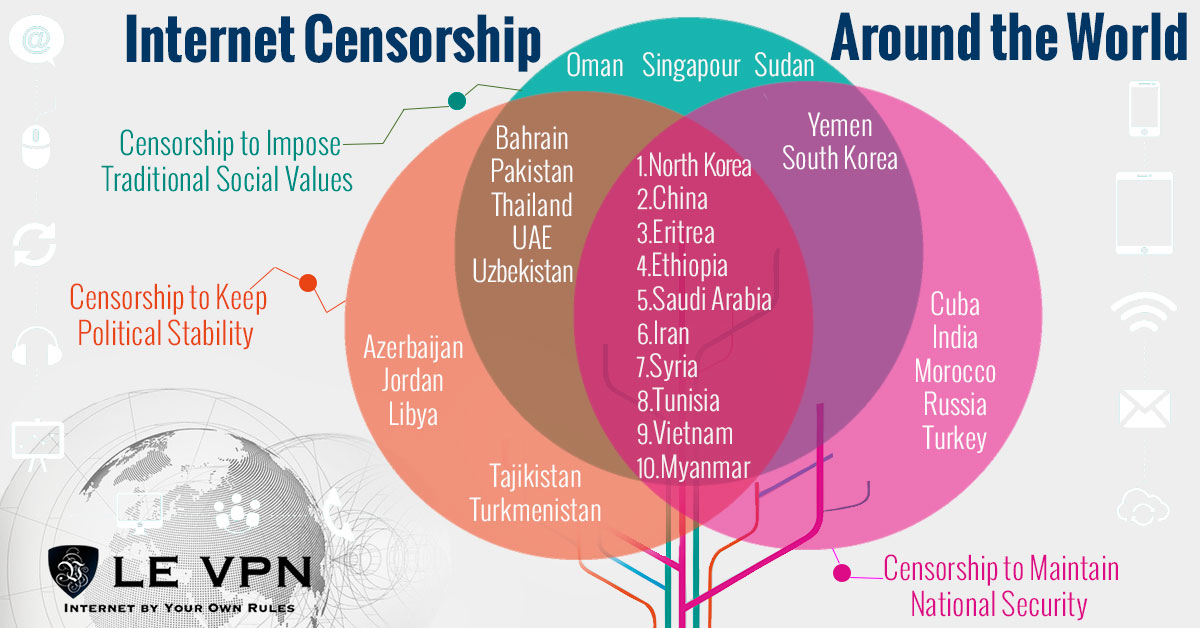
Censorship. In some countries - China being the most prominent - entire streaming platforms, including YouTube, are blocked at the national level, along with social networks and news sites.
Both problems have the same root: your IP address gives away your location, and your traffic passes through networks that filter it. And both have the same solution - a VPN.
How Le VPN smooths the way
Le VPN routes your connection through an encrypted tunnel to a server in a country of your choice. That does three useful things at once:
- It unblocks geo-restricted streams. Connect to a server in the content's home country - the US for American channels, the UK for British catch-up TV, and so on across servers in 100+ locations - and the platform treats you as a local viewer. You can confirm your new location on the IP test page.
- It defeats censorship. Because your traffic is encrypted, national filters can't see which sites you're visiting. For heavily censored countries that also detect and block VPN traffic - China, Iran, Russia and others - Le VPN's Stealth WireGuard protocol adds obfuscation designed to get through deep packet inspection.
- It hides your identity. The websites you visit see the VPN server's IP, not yours, and the network you're on sees only encrypted data. Your viewing habits stay anonymous, and your connection is guarded against snooping - particularly valuable on public Wi-Fi while travelling.
For performance, choose the WireGuard protocol in the Le VPN app - the fastest of the four on offer (OpenVPN, WireGuard, Stealth WireGuard, IPSec/IKEv2) and easily capable of HD and 4K video. Apps are available for Windows, macOS, iOS and Android, one account covers up to 10 simultaneous connections, and Le VPN’s included SmartDNS option can unblock supported channels on smart TVs and consoles that can’t run VPN software. If a particular stream buffers, switching to a nearby server in the same country usually fixes it.
Stream without friction
A smoother streaming experience isn’t one big fix - it’s a stable connection, sensible quality settings, and an internet that doesn’t slam doors in your face because of your location. The first two are habits; the third is Le VPN. Sign up - your first purchase is covered by a 30-day money-back guarantee - and make every stream, live or on demand, a smoother process.
About the author
Le VPN Blog Contributor
Shalini Nagaonkar is a longtime contributor to the Le VPN blog, writing on cyber security, digital privacy, and how to stay safe online. Her articles cover everything from practical VPN use cases to the latest developments in online security.
Articles by Shalini Nagaonkar →
