How To Hide Your IP Address
Your IP address is your address on the internet - and like a home address, it says more about you than you might think. Every website you visit sees it, every tracker logs it, and it reveals your approximate location and your internet provider. If you want privacy online, hiding your IP address is step one. Here are the four common ways to do it, their trade-offs, and why a VPN is the most reliable choice.
Why hide your IP address?
- Privacy. Your IP is the thread that ties your browsing together across sites and sessions. Advertisers and data brokers use it to build profiles; websites use it to identify repeat visitors even without cookies.
- Location. An IP address maps to a city or region. Hiding it stops websites from knowing where you are - and lets you appear to be somewhere else entirely.
- Security. An exposed IP can be targeted directly - from DDoS attacks against gamers to port scans against your home router.
- Access. Geo-restrictions and censorship both work by checking your IP. Change it, and blocked content opens up.
Curious what your IP currently reveals? Check the Le VPN IP test page - it shows your address, location, and provider as any website sees them.
Method 1: Use public Wi-Fi
Connect at a café or library and websites see that network’s IP address instead of your home one. Technically, your usual IP is hidden - but this is the worst trade in privacy: you’ve swapped a minor identifier for major exposure. Open hotspots are prime territory for snooping and fake access points, your traffic is visible to whoever runs (or has compromised) the network, and you’ve only moved your identity, not protected it. If you use public Wi-Fi at all, do it with a VPN on top.
Method 2: Proxy servers
A proxy re-routes your browser traffic through another server, so websites see the proxy’s IP. The catch: most proxies - especially free web proxies - don’t encrypt anything, meaning the proxy operator can read and log all your traffic. Free proxies are frequently run precisely to harvest data, inject ads, or worse. They’re also slow, break many websites, and cover only your browser, not the rest of your apps. As an anonymity tool, a proxy is a VPN with the safety features removed.
Method 3: Tor
The Onion Router bounces your connection through several volunteer relay nodes, hiding your IP behind strong, layered encryption. It provides serious anonymity - at serious cost: browsing is slow, streaming is impractical, many sites block Tor exit nodes, and because the network is also used for criminal activity, Tor traffic attracts extra scrutiny from authorities, and merely using it is visible to your ISP. Tor has its place for high-stakes anonymity, but it’s overkill - and under-comfortable - for everyday use.
Method 4: Virtual Private Network - the reliable way
A VPN routes all of your device’s traffic through an encrypted tunnel to a server you choose, and the world sees that server’s IP instead of yours. It’s the only method on this list that hides your IP and encrypts your traffic and stays fast:
- Websites, trackers, and snoopers see only the VPN server's anonymous IP address.
- Your ISP and any local network see only encrypted data - no browsing history to log.
- You pick the exit country deliberately, so unblocking websites and overcoming geo-restrictions is built in: choose a UK server to watch BBC or ITV abroad, a server back home to keep your usual services while traveling.
- With modern protocols like WireGuard, speeds stay close to your normal connection.
Choose a reliable provider - it matters
The VPN approach is only as trustworthy as the company running the servers. Free VPN services have to fund themselves somehow, and that usually means logging and monetizing user activity - putting your privacy at risk in the name of protecting it. A paid service with a real privacy commitment is the better path.
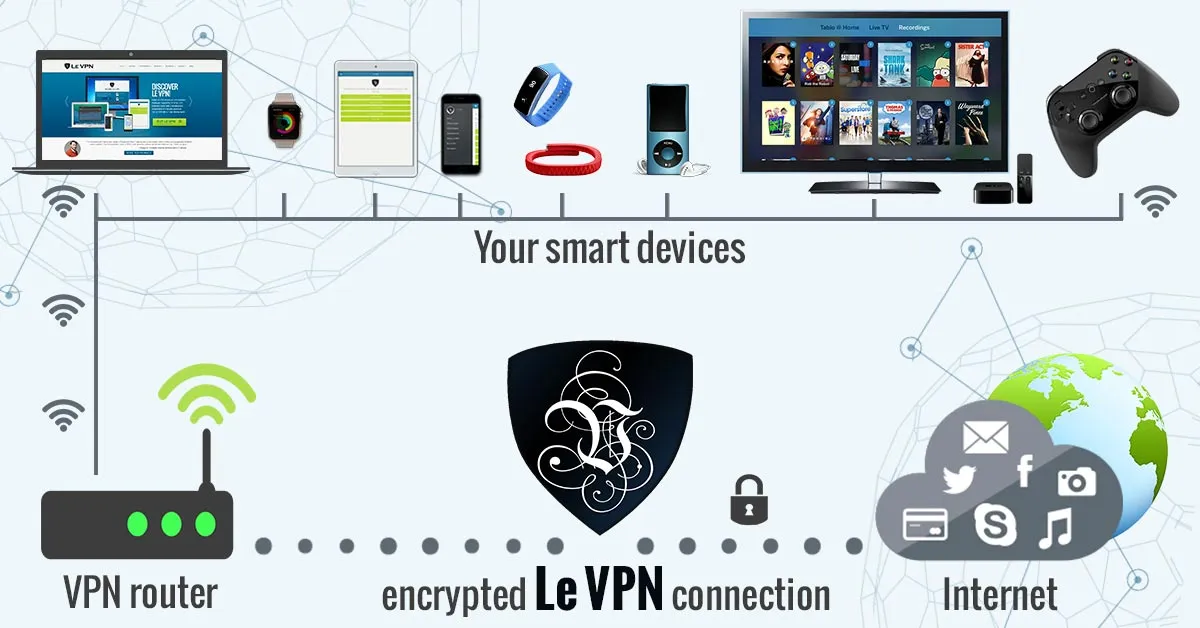
This matters beyond your browser, too. With the Internet of Things filling homes with connected devices, routing your network through a VPN adds a protective layer for gadgets that can’t defend themselves.
Opt for Le VPN
Le VPN has provided reliable service to users across the globe for many years, with competitive packages and everything you need to hide your IP well:
- Servers in 100+ locations across the Americas, Europe, the Middle East, Asia-Pacific and Africa - pick any of them as your new virtual address.
- AES-256 encryption with modern protocols: OpenVPN, WireGuard, Stealth WireGuard (which disguises VPN traffic in censored countries), and IPSec/IKEv2 on iOS.
- Apps for every platform - Windows, macOS, iOS, and Android - with up to 10 simultaneous connections, so the mobile app keeps you protected on the go while your computer stays covered at home.
- A 30-day money-back guarantee on your first purchase.
Hiding your IP address is the highest-value privacy move you can make in five minutes. Install Le VPN, pick a server, connect - and browse, stream, and explore with your real address kept to yourself.
About the author
Le VPN Blog Contributor
Shalini Nagaonkar is a longtime contributor to the Le VPN blog, writing on cyber security, digital privacy, and how to stay safe online. Her articles cover everything from practical VPN use cases to the latest developments in online security.
Articles by Shalini Nagaonkar →
