What Are The Security Advantages Of Using A VPN?
VPNs have many security advantages, but not all services are the same. Read on to find out how a VPN for online safety makes your connection secure - and how to make it even more secure.
Why Your Connection Needs Protecting
Internet privacy is one of the defining issues of our time. Whether you notice it or not, your online activity is constantly observed. Some of it is routine: your ISP logs usage, websites record your IP address and approximate physical location, advertisers stitch together browsing profiles. Some of it is anything but routine: hackers hunting for credentials, malware operators looking for a way in, and in parts of the world, government censors deciding what you may read and watching who reads it.
VPNs - virtual private networks - began life keeping corporate networks secure for remote employees. Today they’ve become an everyday consumer tool, and for good reason. If you’ve ever worked from a café’s Wi-Fi, logged into your bank from a hotel, or travelled somewhere the internet is filtered, your data has been exposed to people who could watch which sites you visit, intercept what you send, or worse.
How A VPN For Online Safety Keeps Your Internet Secure
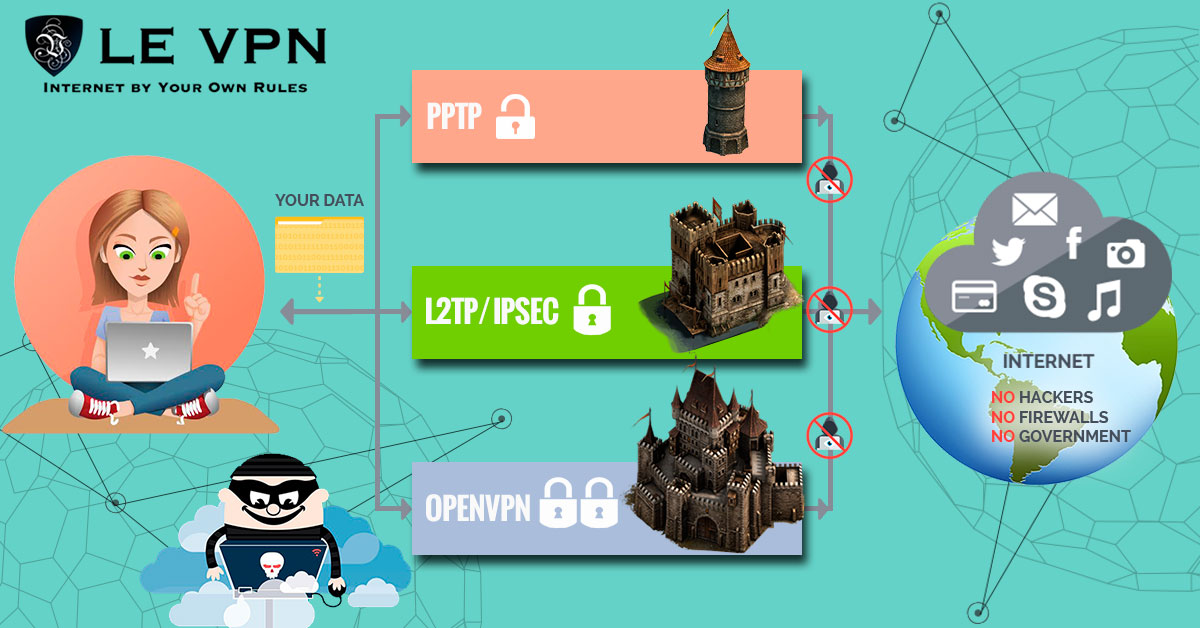
A VPN’s security rests on one core mechanism: your traffic travels through an encrypted tunnel between your device and a dedicated VPN server. That single change delivers several protections at once:
- Confidentiality: everything inside the tunnel is encrypted with strong ciphers (AES-256 class), so even if your traffic is intercepted on a hostile network, it's unreadable.
- Authentication and integrity: the protocol verifies you're talking to the genuine server and that data hasn't been tampered with in transit.
- Anonymity of routing: websites and snoopers see the VPN server's IP address, not yours - stripping away the identifier used to locate and profile you.
How well this works depends on the protocol. Modern VPNs have left the weak legacy protocols of the 2000s behind: PPTP, once the most common option, has known vulnerabilities and should be considered obsolete. Le VPN’s current line-up is OpenVPN (the battle-tested open-source standard, running over several ports to work on restrictive networks), WireGuard (a lean modern protocol that pairs state-of-the-art cryptography with excellent speed), Stealth WireGuard (WireGuard with obfuscation, designed to slip past deep packet inspection in censored countries), and IPSec/IKEv2 on iOS. You can compare them on the Le VPN protocols page.
One myth is worth killing early: total anonymity. No tool makes you perfectly anonymous online, and providers who promise it are overselling. What a good VPN genuinely delivers is privacy - the condition of browsing without your ISP, hotspot operators, trackers, or opportunistic attackers looking over your shoulder. Privacy is achievable, valuable, and exactly what you should be buying.
The need isn’t limited to computers, either. Phones and tablets connect to more untrusted networks than any laptop. Le VPN’s iOS and Android apps provide the same encrypted tunnel plus extras designed for mobile life: DNS-level Threat Protection that blocks known malicious and phishing domains, and Breach Detection that warns you if your email address appears in a leaked database.
How To Get Even More Safety With A VPN
Protect against connection drops. The classic worry: what happens if the VPN disconnects mid-session? A kill switch answers it by blocking traffic when the tunnel fails, and there’s good news on this front - WireGuard and Stealth WireGuard behave this way at the protocol level: if the tunnel drops, traffic simply doesn’t flow outside it. Using a modern protocol gives you kill-switch behaviour by design.
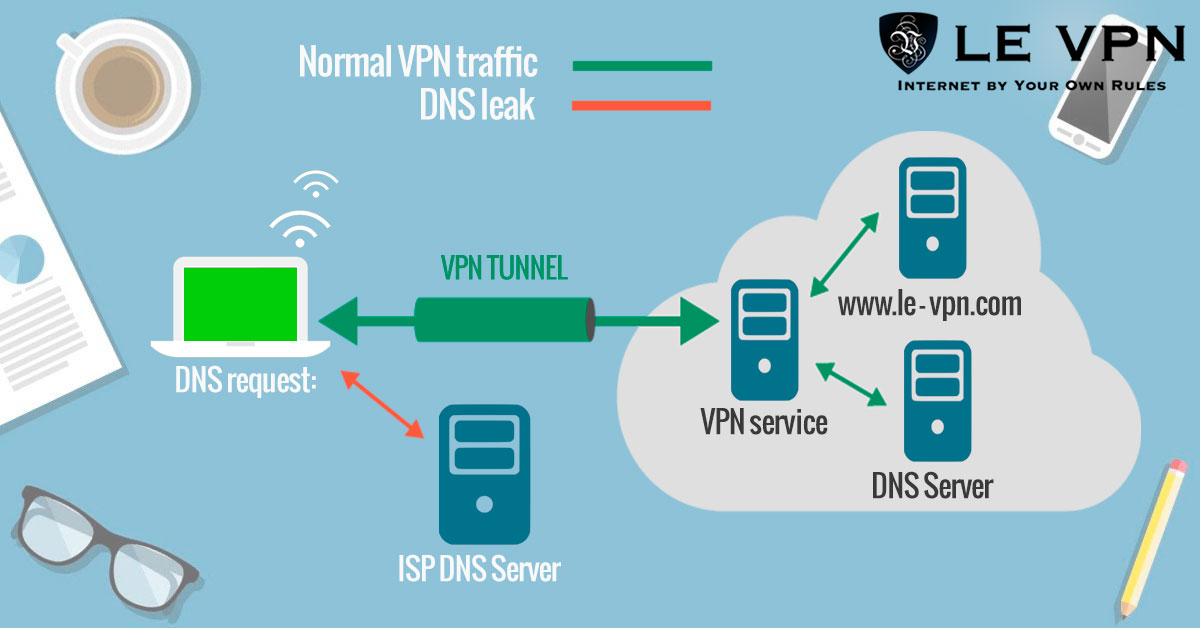
Check for DNS leaks. DNS is the internet’s phone book, and a “DNS leak” means your device sends its lookups to your ISP’s DNS server instead of through the VPN - quietly revealing every site you visit. Testing is easy: with the VPN connected, use a DNS leak test site, or start with Le VPN’s own IP address test page to confirm what the internet sees. Clearing your DNS cache and cookies periodically also helps remove stale identifiers picked up outside the tunnel.
Choose your server thoughtfully. For everyday safety, the nearest server gives the best speed. For maximum privacy from a government that monitors its internet, connecting through a server outside that jurisdiction is the sensible move - one reason Le VPN’s spread of 100+ locations matters.
Skip the exotic tricks. Chaining two VPN services together sounds like double security but mostly delivers double slowdown and broken connections. A single well-configured modern protocol is the right answer for almost everyone.
Beware "Free" VPNs
Running a VPN network costs real money, so ask how a free service pays for itself. The recurring answer: with your data. The cautionary tale is Facebook’s Onavo - a “privacy” VPN that in reality routed users’ traffic through Facebook’s servers so their activity could be analysed, until public backlash shut it down. A free VPN that monetises surveillance is worse than no VPN at all. You get what you pay for, and privacy is precisely the wrong place to bargain-hunt.
What About TOR?
TOR routes your traffic through layers of volunteer-run nodes and has legitimate uses - but it’s no substitute for a VPN in daily life. Traffic exiting a TOR node to the ordinary web is not encrypted by TOR, exit nodes can be monitored, many sites block TOR traffic outright, and connection speeds make streaming or video calls impractical. The TOR Project itself is honest that it cannot guarantee anonymity. For fast, private, everyday browsing, an encrypted VPN tunnel is the practical tool.
So, Do You Really Need A VPN?
If you use networks you don’t control, value your privacy, or ever travel - yes. Le VPN has been in the business since 2010 and offers servers in 100+ locations across the Americas, Europe, the Middle East, Asia-Pacific and Africa, modern protocols including WireGuard and Stealth WireGuard with AES-256-class encryption, up to 10 simultaneous connections per account, and HybridVPN with SmartDNS for geo-restricted streaming. Apps cover Windows, macOS, iOS, and Android, and every first purchase is backed by a 30-day money-back guarantee. Don’t wait until it’s too late - get Le VPN now.

