Data Breach Scanner upgrade: full details and manual checks
The Data Breach Scanner in the Le VPN apps just got an upgrade. It still checks the e-mail on your Le VPN account against publicly known data breaches every day, and now shows each breach in the app: its date, what leaked and what to do. You can also run a check with the Check now button.
It comes with every active Le VPN plan.
What is the Le VPN Data Breach Scanner?
The Data Breach Scanner is a screen in your Le VPN app that compares your account's e-mail address with a database of publicly known data breaches and reports what was exposed in each one, with advice on what to do next.
It checks one address: the e-mail on your Le VPN account. Not your phone number, not your passwords, not other addresses. The breaches it reports are leaks at other companies, services that held that address. They are not Le VPN breaches.
Le VPN accounts created since 27 October 2026 have the scanner switched on at sign-up. The first check runs then: if it finds breaches, the app shows a card on the main screen once instead of sending an e-mail.
To open it, start the app, tap Menu, then Data Breach Scanner. On le-vpn.com it is a page of the client area. More about the feature is on our Data Breach Detection page.
How common are data breaches in 2026?
Common enough that a breach notice is close to a normal part of having an e-mail address. The Identity Theft Resource Center tracked 3,322 data compromises in the US in 2025, a record, up 5% from 3,152 in 2024. Those compromises produced 278,827,933 victim notices, down 79% from 2024, which the center puts down to the lack of mega-breaches in 2025. And 70% of the 2025 breach notices did not say how the attack happened (Identity Theft Resource Center, 2026).
People notice. In the center's survey of 1,040 consumers, 80% had received a data breach notice in the past 12 months. Of those who got one, 88% reported at least one negative consequence, and 54% saw more targeted phishing afterwards (Identity Theft Resource Center, 2026). The wider picture, from three separate reports:
| Number | What it measures | Source, year |
|---|---|---|
| 4.99 million US dollars | Global average cost of a data breach to a company, up 12% on the year before | IBM, 2026 |
| 31% | Breaches that start with exploitation of software vulnerabilities, now ahead of stolen credentials as the top way in | Verizon, 2026 |
| 48% | Breaches that involve a third party | Verizon, 2026 |
| 1,008,597 | Complaints received by the FBI Internet Crime Complaint Center in 2025 | FBI IC3, 2026 |
| 20.877 billion US dollars | Reported losses across those complaints | FBI IC3, 2026 |
| 971 | SIM swap complaints in 2025, with 17,366,758 US dollars in reported losses | FBI IC3, 2026 |
| 67,456 | Personal data breach complaints in 2025 | FBI IC3, 2026 |
Breaches happen at other companies, but the cleanup lands on the person whose address was exposed. The scanner's part is to tell you when that happens; the next move, a new password or a call to your bank, is yours.
What does the scanner show you?
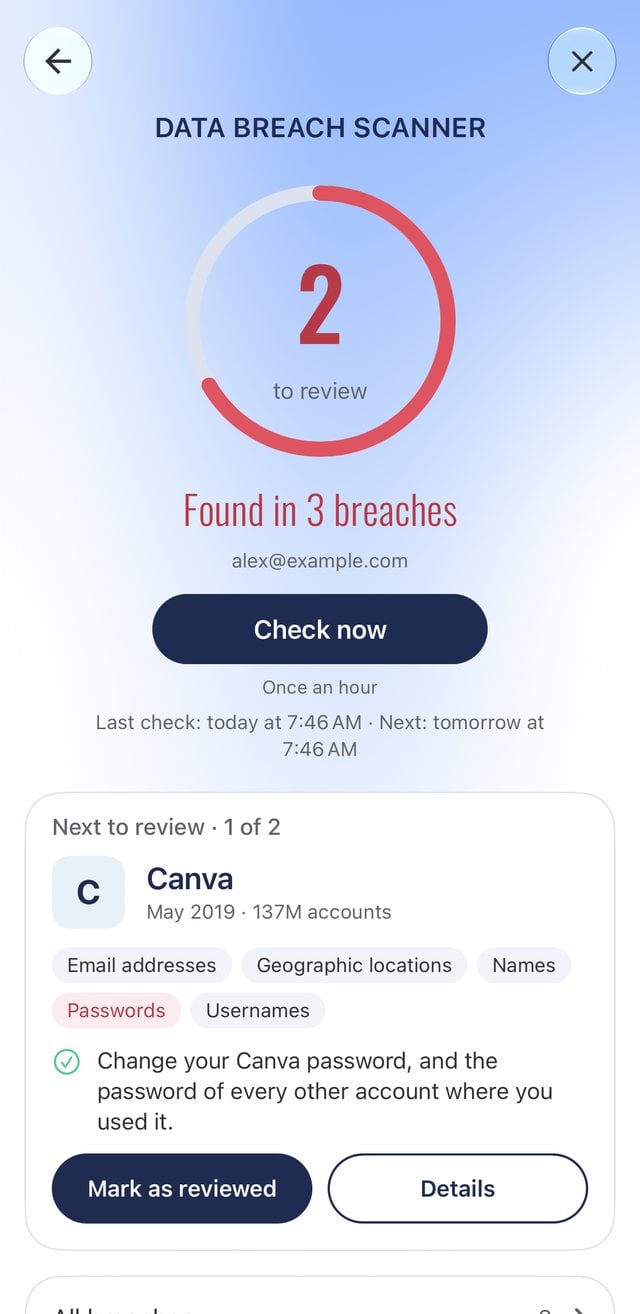
The screen opens on a ring showing the number of breaches left to review. When there are none, the ring turns green and reads "No breaches found". Under it sit the address that was checked, a Check now button, and the times of the last and next checks. Below that, "Next to review" shows one breach at a time: its name, the month and year it happened, how many accounts were in it, the data types exposed, with passwords marked in red, one tip, and two buttons, Mark as reviewed and Details. Further down you find All breaches, What was exposed, which lists every data type across your breaches, What to do, and the Automatic checks and E-mail alerts switches.
Tap Details and you get the full record for one breach: the service name and its website, a New or Reviewed label, the breach date, the number of accounts in it, the address it was found for, the date the scanner found it, what was exposed, a short description of what happened, and what to do about it.
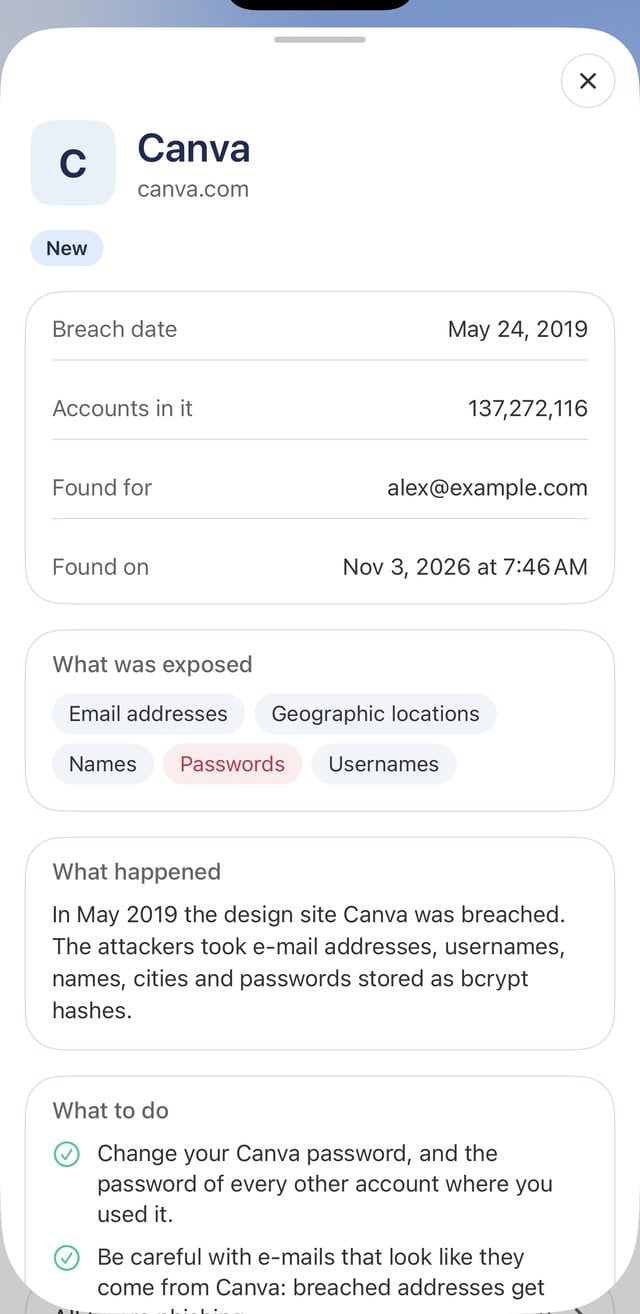
The screenshots in this article come from a test account, so the names and figures you see are example data.
How do you use the Data Breach Scanner, step by step?
On Le VPN accounts created since 27 October 2026 the scanner is already on. On an older account, open the scanner and switch on Automatic checks first. Then:
- Open the Le VPN app on your phone, tablet or computer and open Menu.
- Tap Data Breach Scanner. The ring at the top shows how many breaches are waiting for your review.
- Read the breach under "Next to review": the month and year it happened, how many accounts were in it, and which data types were exposed. Passwords are marked in red.
- Follow the tip on the card. For the full record, including a short description of what happened and the full list of what to do, tap Details.
- Once you have dealt with it, tap Mark as reviewed. This is only for your own tracking: it changes nothing else, you can undo it, and checks carry on as before. Mark all as reviewed clears the whole list in one tap.
- Want a check outside the daily schedule? Tap Check now. It runs once an hour, and the result appears in a few seconds to a few minutes.
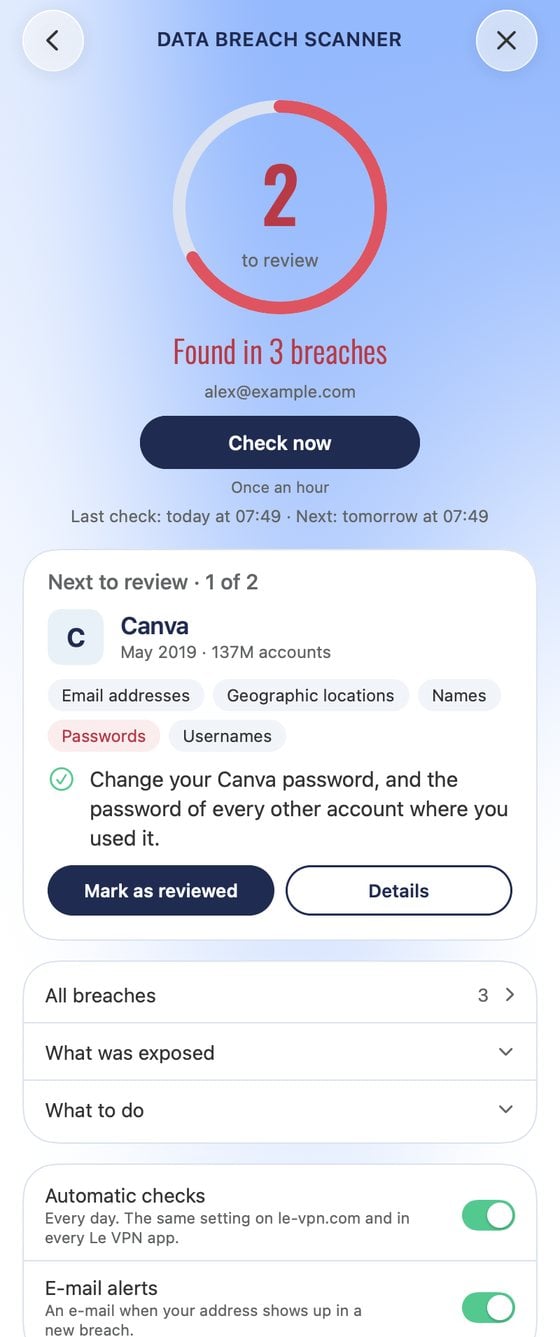
On a Mac, Windows or Linux computer, the scanner is a page of the menu inside the app's window; the screenshot above is the Mac app. On le-vpn.com it is a page of the client area, with the same ring, the same list and the same switches as the apps.
When does the scanner help?
An old, reused password. A breach from years ago lists Passwords among the exposed data. The tip says to change that password at the service, and at every other account where you used it. Once you have done that, tap Mark as reviewed and the count in the ring goes down by one.
A leaked phone number. The scanner checks your e-mail address, but some breaches list Phone numbers among the data leaked with your address. The app then warns about scam calls and texts, and says never to read a text code out to a caller. SIM swap fraud is the reason: the FBI IC3 received 971 SIM swap complaints in 2025, with 17,366,758 US dollars in reported losses (FBI IC3, 2026). As general advice, ask your mobile carrier about a SIM PIN or a port-out lock.
A breach in the news. You do not have to wait for the daily check. Tap Check now, which runs once an hour. One limit to know: a breach appears only once it is publicly known and added to the breach database, so a very fresh incident can take time to show up.
A family member. The scanner checks the address of the account it belongs to. A parent or partner with their own Le VPN account and their own address gets their own checks and their own e-mail alerts. Sitting down with them to go through Details and What to do is the practical part.
How do alerts and automatic checks work?
Two switches run the whole thing. The first, Automatic checks, checks your address every day. On a new account the first check runs at sign-up, and if it finds breaches the app shows a card on the main screen once instead of an e-mail. Automatic checks is a single setting: change it in any Le VPN app or in the client area on le-vpn.com and it changes everywhere. The second, E-mail alerts, sends a message only when your address turns up in a new breach, written in your language. The scanner sends no regular summaries.
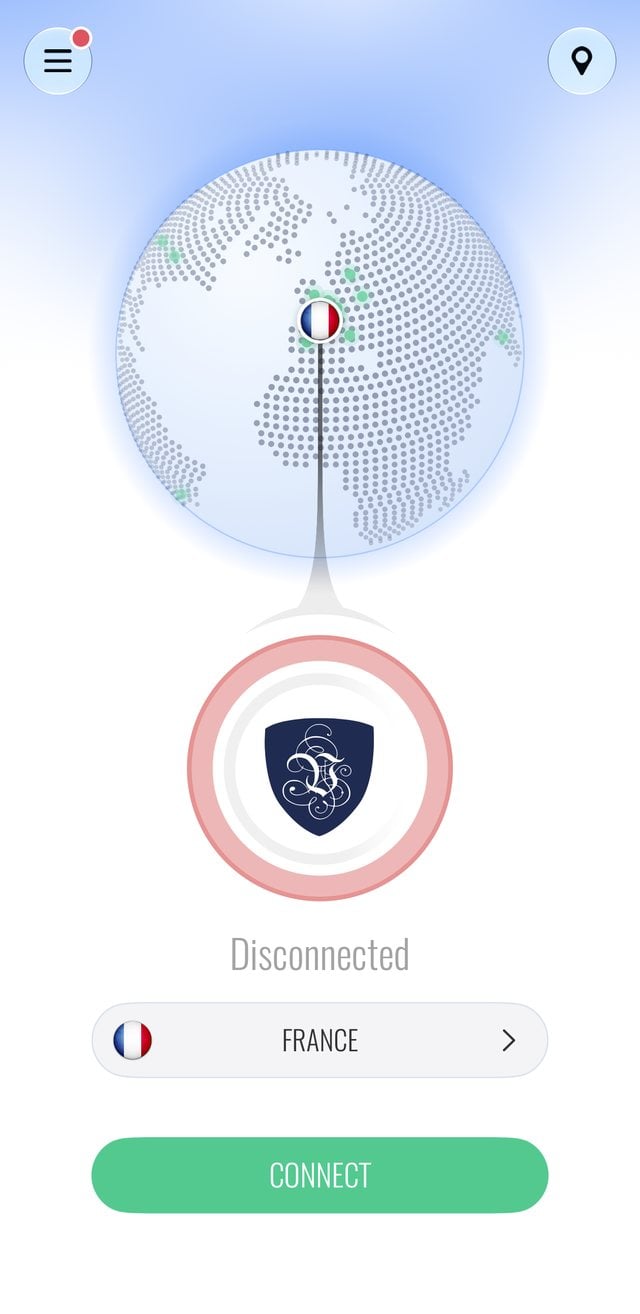
While a breach waits for your review, the app keeps count in plain sight: the Menu button on the main screen carries a red dot, and the Data Breach Scanner row inside the menu shows the number in red. Mark the breaches as reviewed, or use Mark all as reviewed, and the dot disappears.
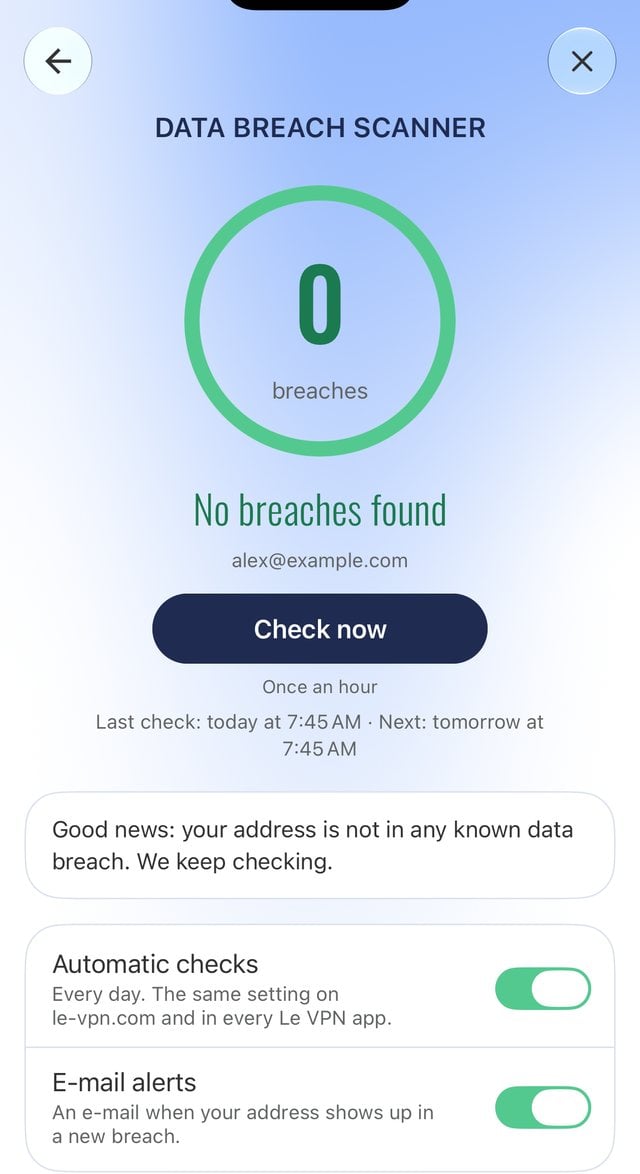
Between the daily checks you can tap Check now, which runs once an hour and returns a result in a few seconds to a few minutes. Both switches can be turned off at any time, from any app or from the client area.
What does the scanner check, and what does it not do?
The scanner checks one thing: the e-mail address on your Le VPN account. The app asks for no extra password and reads the result through your existing Le VPN login. You can switch automatic checks and e-mail alerts off at any time.
It has limits worth knowing. It checks one address, not your phone number, passwords or other e-mail accounts. It compares against publicly known breaches, so it reports what is already public. And it does not stop anything: a breach happened at another company before the scanner ever saw it. The scanner tells you what leaked and what to do; changing the password, calling the bank, ignoring the scam call, those steps are yours. A VPN works on a different problem altogether, your connection, and it does not stop a company from being breached. On the connection side, Le VPN's Threat Protection blocks known malware, phishing and scam sites while you are connected.
Which Le VPN apps have the scanner?
The scanner is in these versions of the Le VPN apps:
- iPhone and iPad: version 3.7.0, from the App Store.
- Android phones and tablets: version 3.9.0, from Google Play.
- Mac: version 3.7.0, from the Mac App Store or as a download from le-vpn.com.
- Windows and Linux: version 3.3.0, released on 3 November 2026, as a download from le-vpn.com.
The Android app downloaded from le-vpn.com is not on 3.9.0 yet, so for now the scanner on Android comes through Google Play.
If your app is older, update it. On a phone or tablet, open the App Store or Google Play, find Le VPN and tap Update. On a computer, get the current installer from our download page. The scanner screen looks the same everywhere, and the Automatic checks and E-mail alerts switches are shared settings, so a change you make in one app applies everywhere, including the client area on le-vpn.com.
One gap to know about: the TV apps, on Apple TV, Android TV and Fire TV, do not have the scanner. If you use Le VPN mostly on a TV, check the scanner from a phone, a computer or the client area; the daily checks and e-mail alerts run as long as they are switched on.
About the author
Le VPN Apps & Product
The Le VPN Product Team builds the Le VPN apps for iPhone, iPad, Mac, Windows, Linux, Android, Apple TV, Apple Vision Pro and Fire TV. They write here when something ships: a new app, a new platform, a new feature, and now and then a note on why a thing took longer than expected. Product posts are checked against the shipping build and the app's own release notes before they are published.
Articles by Le VPN Product Team →