
The best VPN for Apple Vision Pro: privacy in spatial computing
Le VPN runs natively on Apple Vision Pro. Install it from the App Store, sign in, and a floating Le VPN window sits in your space - one look and a tap, and everything the headset sends travels through the encrypted tunnel.
- A native visionOS app - built for spatial computing, not ported to it
- WireGuard and Stealth protocols with built-in Threat Protection
- High-speed servers across 100+ locations worldwide
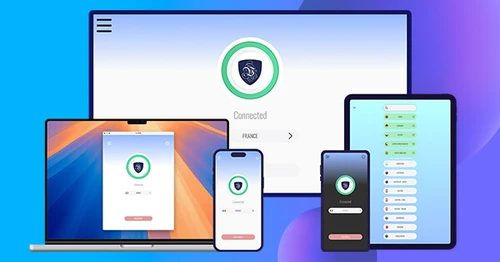
- One subscription covers your Vision Pro, iPhone, iPad, Mac and Apple TV
- 30-day money-back guarantee - try risk-free
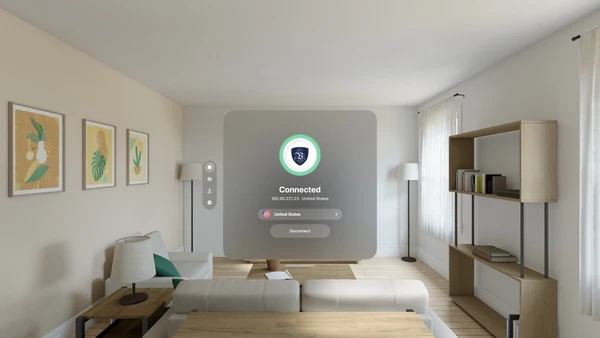
What does a VPN on Vision Pro do?
Apple Vision Pro is a full computer on your face: Safari windows, streaming apps, video calls and immersive environments, all pulling data over whatever Wi-Fi you happen to be on. A VPN encrypts that entire connection and replaces the headset's IP address with one from our secure server network. Your internet provider, the hotel or office network, and anyone else in between can't see what you browse or watch in your private space - and with servers in 100+ locations, the content you reach isn't limited by where you're standing.
How to get a VPN on Apple Vision Pro

Step 1
Sign up for Le VPN
Choose your subscription plan and create your account. All plans include a 30-day money-back guarantee.

Step 2
Install the app on your Vision Pro
Open the App Store in visionOS, search for Le VPN, and install. Sign in, and approve the VPN configuration when visionOS asks - a one-time confirmation.

Step 3
Connect and explore securely
Look at Connect and tap for instant protection with our fastest server, or pick any location from 100+ options worldwide.
What are the benefits of a VPN on Vision Pro?
Privacy for Your Most Personal Computer
Apple calls Vision Pro a personal device, and the browsing you do inside it is about as personal as computing gets. Le VPN wraps all of it in military-grade encryption under our strict zero-logs policy: no browsing history, no connection times, no IP addresses collected - ever. What happens in your space stays in your space, whether you're on home Wi-Fi, an office network, or a hotel connection on the road.

A Cinema Screen Without Borders
The Vision Pro turns any room into a cinema - and Le VPN makes sure the programming isn't limited by geography. Connect through servers in 100+ locations to keep your home streaming services while traveling, catch broadcasts that only air in other countries, and explore international libraries on the biggest virtual screen you've ever owned. Our high-speed network is built for exactly this kind of bandwidth.

Complete Apple Ecosystem Protection
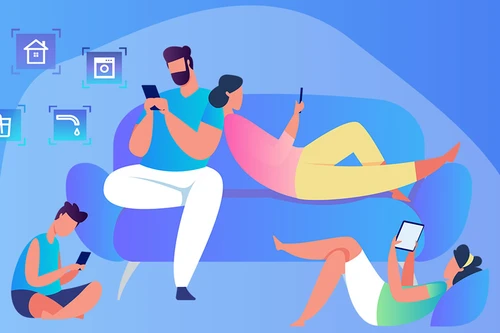
Le VPN for Vision Pro shares an App Store listing with our iPhone, iPad, Mac and Apple TV apps. The apps are free to install, and one Le VPN subscription signs in on all of them - up to 10 devices at once. Your headset, your phone, your laptop and your TV all carry the same protection, each with an app built natively for its platform.
Security Innovations That Keep You Safe
Censorship-Resistant Protocols
Le VPN for Vision Pro connects through WireGuard and our Stealth protocol, switched in Settings. Stealth masks VPN traffic as ordinary encrypted browsing, so networks that detect and block VPN connections - hotels, campuses, entire countries - generally can't tell it apart from a regular HTTPS session. And because WireGuard is stateless, traffic either flows through the tunnel or not at all: a kill switch at the protocol level.
Block Trackers and Malware
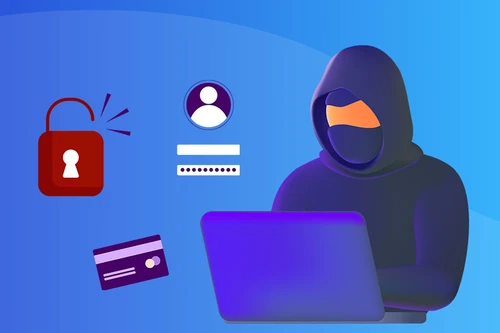
Threat Protection stops advertising trackers, phishing sites and known malware domains at the DNS level, before they ever load in your space. It works across everything on the headset - Safari windows, streaming apps, immersive experiences - with nothing to configure and no extensions to install. Browsing in visionOS feels cleaner and loads faster, and the protection never switches off.

Plays Nicely With Your Home Setup
The Bypass local networks setting lets your Vision Pro keep talking to devices around you - your Mac for Mac Virtual Display, local media servers, smart home gear - while everything bound for the internet stays inside the encrypted tunnel. Check the result anytime with the built-in Test your IP screen, which shows exactly what the internet sees.
Trusted by 1,000,000+ users
Le VPN compatibility with Apple Vision Pro
Le VPN runs on Apple Vision Pro with visionOS 2 or later, as a native visionOS app - not an iPad app in compatibility mode.
It installs from the same App Store listing as our iPhone, iPad, Mac and Apple TV apps, so one account covers every Apple device you own, and the app follows your system language with 15 languages supported.
Download the latest Le VPN app for all devices




Download Le VPN for Mac (App Store)
For Apple Silicon and Intel Macs. Learn more about our Le VPN for Mac


Download Le VPN for Linux ( .deb)
For Ubuntu, Debian and Mint. Learn more about our Le VPN for Linux


Also available on routers:

ASUS
WireGuard · OpenVPN

GL.iNet
WireGuard · OpenVPN

TP-Link
WireGuard · OpenVPN

FRITZ!Box
WireGuard

Freebox
WireGuard · OpenVPN

Keenetic
WireGuard · OpenVPN

MikroTik
WireGuard · OpenVPN

UniFi
WireGuard · OpenVPN

Synology
OpenVPN

OpenWrt
WireGuard · OpenVPN

DD-WRT
WireGuard · OpenVPN

pfSense
WireGuard · OpenVPN

OPNsense
WireGuard · OpenVPN
Try Le VPN risk-free for 30 days!
Don't like it within a month? Get your money back with no questions asked!

Quick recap
This page lets you install Le VPN on Apple Vision Pro: a native visionOS app from the App Store that encrypts everything the headset sends and hides its IP behind servers in 100+ locations. It connects through WireGuard and Stealth WireGuard, blocks trackers and malware with Threat Protection, and keeps local devices reachable with Bypass local networks - under Le VPN's strict no-logs policy. It needs visionOS 2 or later, and one subscription covers up to 10 devices across all your Apple screens and beyond.
- A native visionOS app - install from the App Store on the Vision Pro, sign in, connect with a look and a tap
- Requires visionOS 2 or later; shares its App Store listing with the iPhone, iPad, Mac and Apple TV apps
- WireGuard and Stealth WireGuard protocols - Stealth gets through networks that block VPNs
- Threat Protection blocks trackers, phishing and malware at the DNS level across the whole headset
- Bypass local networks keeps Mac Virtual Display and home devices working while internet traffic stays encrypted
- 100+ server locations, Test your IP built in, up to 10 devices on one account, 30-day money-back guarantee

