
The best VPN for Linux: download the native Le VPN app
Le VPN now runs natively on Linux. Install it from our signed APT or DNF repository - or grab the .deb or .rpm package - and your system keeps it up to date together with everything else. No scripts to babysit, no configuration files to juggle.
- Native app for Ubuntu, Debian, Linux Mint and Fedora - Arch coming soon
- WireGuard and Stealth protocols with built-in Threat Protection and Ad Blocker
- Leak-proof by design: a firewall keeps every packet and DNS query inside the tunnel
- High-speed servers across 100+ locations worldwide
- 30-day money-back guarantee - try risk-free
Get Le VPN Install on Linux
Direct downloads: .deb for Ubuntu, Debian and Mint, .rpm for Fedora - always the newest release.
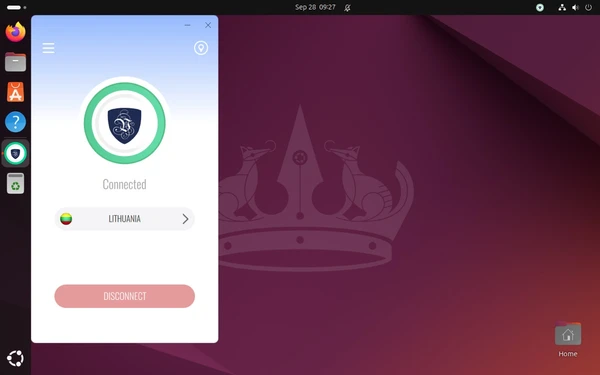
What does a VPN for Linux do?
A VPN for Linux encrypts every bit of data leaving your computer and hides your actual IP address behind our secure servers. Your internet service provider, network administrators, and potential attackers can't see what websites you visit, what you download, or what you're working on. Le VPN also lets you bypass geographic restrictions by connecting to servers in 100+ locations, giving your Linux machine unrestricted access to content and services from around the world. And because Linux users expect tools that behave, our app does its work through one network interface, one firewall table and the tunnel's DNS servers - all of which disappear cleanly the moment you disconnect.
How to install Le VPN on Linux
We recommend installing from the Le VPN repository: your system then updates Le VPN together with everything else. You need a 64-bit PC (x86_64), an administrator password for the sudo commands, and a Le VPN account to sign in.
Ubuntu, Debian and Linux Mint
Three commands: the first adds the Le VPN repository and its signing key, the second reads it, the third installs Le VPN and starts its background service.
sudo wget -O /etc/apt/sources.list.d/levpn.sources https://www.le-vpn.com/app/linux/levpn.sources
sudo apt update
sudo apt install levpn
Prefer a one-off package? Download the .deb and run sudo apt install ./levpn.deb - it installs the same app, but updates only when you install a newer package.
Fedora
Two commands. The first time, dnf downloads the Le VPN signing key and asks whether to import it - check that the fingerprint reads F8BA959181E40362EB1BDA0F622EC2424E9F3877 and answer y, then y again for the package.
sudo dnf config-manager addrepo --from-repofile=https://www.le-vpn.com/app/linux/levpn.repo
sudo dnf install levpn
Prefer a one-off package? Download the .rpm and run sudo dnf install ./levpn.rpm.
Arch Linux
Our levpn-bin package is coming to the AUR. Once it is published, install it and start the Le VPN service (Arch leaves that to you):
git clone https://aur.archlinux.org/levpn-bin.git
cd levpn-bin
makepkg -si
sudo systemctl enable --now levpn-daemon.service
With an AUR helper, yay -S levpn-bin will replace the first three lines.
Open Le VPN and connect
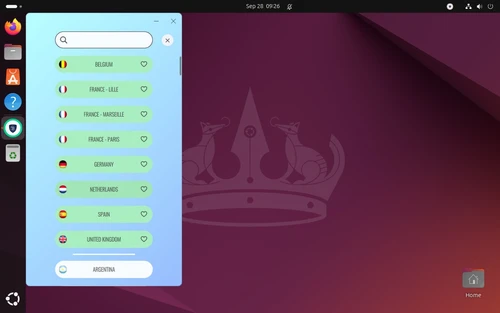
Open your application menu, search for "Le VPN" and click it. Sign in with your Le VPN username or email and your password. Click the server name under the shield to pick a location, then hit Connect - Stealth is on by default, ready for networks that block VPNs.
On desktops with a tray (Ubuntu, KDE, Cinnamon), closing the window keeps Le VPN running in the tray: its icon connects, disconnects and reopens the window. If you installed from the repository, Le VPN updates with your normal system updates - the app needs no update button of its own. To verify a downloaded package, our signed checksums are published alongside it.
What are the benefits of using a Linux VPN?
A Real App, Not a Script Collection
Until now, running a VPN on Linux usually meant importing configuration files, editing Network Manager connections, and re-doing it all when something changed. The native Le VPN app replaces that with the same experience our Windows and Mac users get: sign in once, pick a server from the list or the search box, mark your favourites, and connect with one click - from the window or the tray icon. Light and dark themes follow your desktop, and the app speaks 15 languages. Under the hood it remains honest Linux software: a systemd service, a predictable network interface, and packages delivered through your distribution's own tools.
Best-in-Class Security & Privacy
Le VPN protects your Linux machine with military-grade encryption that makes your online activities invisible to hackers, ISPs, and surveillance. Our proprietary server technology operates under a strict zero-logs policy - we don't collect, store, or share your browsing history, connection times, or IP addresses. Whether you're handling sensitive work files, administering servers over SSH, or simply browsing, your data stays completely private. Even we can't see what you're doing online.

Stream and Browse Everything
Le VPN for Linux opens up a world of content possibilities. With servers in 100+ locations, you can explore streaming libraries from different countries, discover international shows before they reach your region, and keep access to your home services while traveling. Your Linux box becomes your gateway to the entire internet - whether it's a laptop on hotel Wi-Fi or the media machine under your TV.

Maximum Speed, Zero Slowdown
Your machine's speed shouldn't suffer for security. Le VPN connects through WireGuard, the modern standard that lives in the Linux kernel's own family tree - lean, fast, and built for exactly this. Our optimized infrastructure ensures minimal latency whether you're video conferencing, pushing large builds to a remote server, or streaming 4K content. Work at full speed with full protection.

Security Innovations That Keep You Safe
Censorship-Resistant Protocols
Le VPN's Stealth protocol - on by default in the Linux app - masks your VPN traffic as ordinary web browsing, making it invisible to sophisticated blocking systems. While standard VPNs get detected and blocked by deep packet inspection and advanced firewalls, Le VPN's technology succeeds, giving you reliable access regardless of network restrictions. Prefer plain WireGuard? Switch it off in the menu and the app connects through standard WireGuard instead.

Zero-Leak Architecture
While you're connected, a firewall keeps every packet and every DNS query inside the tunnel - including the moment you switch from one server to another. Traffic either flows through the encrypted tunnel or it doesn't flow at all, which gives you a kill switch at the protocol level rather than a fragile monitoring layer. Need your printer or local shares? Allow Local Connections lets your own network through while everything else stays protected.

Block Trackers and Malware
The Linux app ships with the same protection suite as our other desktop apps: Block Online Threats stops phishing sites, scam pages and malware domains before they reach you, and the Ad Blocker filters out advertising networks and their trackers at the DNS level. Both work silently in the background with no browser extension needed - faster page loads, cleaner browsing, protection that's always on.

Looks at Home on Your Desktop
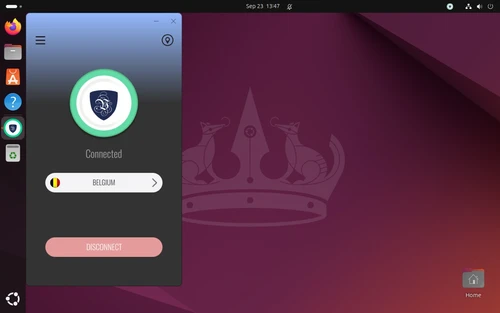
The app follows your desktop's light or dark theme on GNOME, KDE Plasma and Cinnamon, on Wayland and X11 alike. Auto Connect brings the VPN up when the app starts, and the app can start with your computer - minimised to the tray if you like. It's the Le VPN you'd recognize from any of our platforms, dressed for Linux.
15 Years of Proven Reliability
Since 2010, Le VPN has navigated an evolving threat landscape while maintaining uninterrupted service for users worldwide. We've countered sophisticated DDoS attacks, adapted our technology to defeat emerging censorship systems, and maintained reliable connections even as blocking mechanisms grow more aggressive. The Linux app is the newest member of that family - built on the same infrastructure, the same protocols, and the same fifteen years of experience.

Trusted by 1,000,000+ users
Le VPN compatibility with Linux distributions
The app runs on 64-bit PCs (x86_64) with:
Ubuntu 22.04 or later, Debian 12 and 13, Linux Mint 22 and Fedora (an Arch Linux package is coming to the AUR) - and distributions built on them, such as Kubuntu, Pop!_OS, Zorin and elementary, take the same package.
Desktops: GNOME, KDE Plasma and Cinnamon, on Wayland and X11.
Running something else, or a 32-bit or ARM machine? You can still use Le VPN through OpenVPN manual setup or the WireGuard configuration files from your client area.

Download the latest Le VPN app for all devices




Download Le VPN for Mac (App Store)
For Apple Silicon and Intel Macs. Learn more about our Le VPN for Mac


Download Le VPN for Linux ( .deb)
For Ubuntu, Debian and Mint. Learn more about our Le VPN for Linux


Also available on routers:

ASUS
WireGuard · OpenVPN

GL.iNet
WireGuard · OpenVPN

TP-Link
WireGuard · OpenVPN

FRITZ!Box
WireGuard

Freebox
WireGuard · OpenVPN

Keenetic
WireGuard · OpenVPN

MikroTik
WireGuard · OpenVPN

UniFi
WireGuard · OpenVPN

Synology
OpenVPN

OpenWrt
WireGuard · OpenVPN

DD-WRT
WireGuard · OpenVPN

pfSense
WireGuard · OpenVPN

OPNsense
WireGuard · OpenVPN
Try Le VPN risk-free for 30 days!
Don't like it within a month? Get your money back with no questions asked!

Quick recap
This page lets you download Le VPN for Linux: a native app for Ubuntu, Debian, Linux Mint and Fedora (Arch coming soon), installed from our signed APT or DNF repository or as a .deb/.rpm package, and updated by your system's own package manager. The app connects through WireGuard and Stealth WireGuard, keeps every packet and DNS query inside the tunnel with a built-in firewall, and adds Threat Protection and an Ad Blocker - with servers in 100+ locations and a strict no-logs policy.
- Native Linux app for Ubuntu 22.04+, Debian 12/13, Mint 22 and Fedora (Arch coming soon) - 64-bit PCs, GNOME, KDE Plasma and Cinnamon
- Install from the signed APT/DNF repository (recommended - updates arrive with your system updates) or as a one-off .deb/.rpm package
- WireGuard and Stealth WireGuard protocols - Stealth, on by default, slips past DPI and VPN blocks
- Zero-leak design: a firewall keeps all traffic and DNS inside the tunnel, even while switching servers - a kill switch at the protocol level
- Block Online Threats and Ad Blocker filter malware, phishing and trackers at the DNS level
- 100+ server locations, up to 10 devices on one account, light/dark themes, a tray icon, and a 30-day money-back guarantee

