
The best VPN for Apple TV: a real app, right on your TV
For years, putting a VPN on an Apple TV meant configuring a router or settling for SmartDNS. Not anymore. Le VPN for Apple TV is a native tvOS app: install it from the App Store, sign in with the remote, and your whole TV goes through the encrypted tunnel.
- A true VPN app on tvOS - no router setup, no SmartDNS, no workarounds
- WireGuard and Stealth protocols with built-in Threat Protection
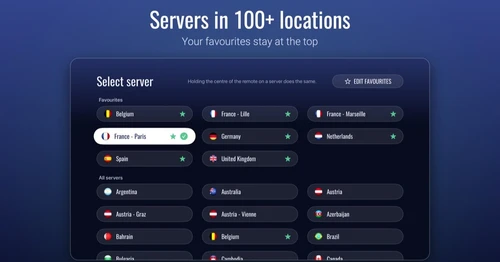
- High-speed servers across 100+ locations - built for 4K streaming
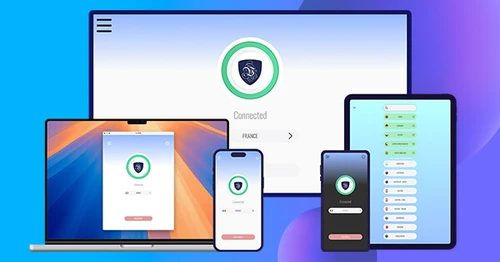
- One subscription covers your Apple TV, iPhone, iPad, Mac and Vision Pro
- 30-day money-back guarantee - try risk-free
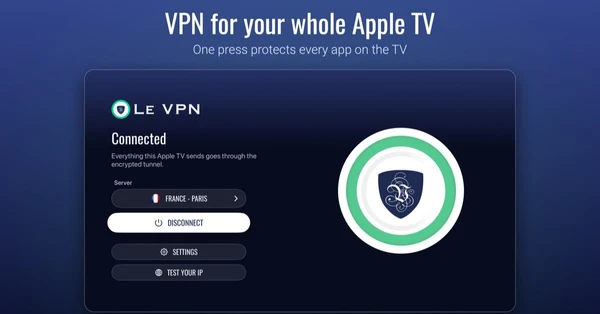
What does a VPN on Apple TV do?
A VPN on your Apple TV encrypts the box's entire internet connection and replaces its IP address with one from our secure server network. Every streaming app on the TV - not just one browser on one device - goes through the tunnel. That shields your viewing from your internet provider and anyone else on the network, stops ISP throttling from ruining a 4K stream, and lets you connect through servers in 100+ locations to watch your home services while abroad or explore libraries from other countries. Unlike SmartDNS, which only redirects a few lookups and encrypts nothing, a real VPN protects everything the Apple TV sends and receives.
How to get a VPN on Apple TV

Step 1
Sign up for Le VPN
Choose your subscription plan and create your account. All plans include a 30-day money-back guarantee.

Step 2
Install the app on your Apple TV
Open the App Store on the Apple TV, search for Le VPN, and install. Sign in with the remote, and allow the VPN configuration when tvOS asks - that's the whole setup.

Step 3
Connect and stream securely
Hit Connect for instant protection with our fastest server, or pick any location from 100+ options - then go straight back to watching.
What are the benefits of a VPN on Apple TV?
Stream Everything, From Anywhere
Your Apple TV is where streaming actually happens - so that's where the VPN belongs. Connect to servers in 100+ locations to keep access to your home streaming services while living or traveling abroad, catch broadcasts that only air in other countries, and explore international libraries from your couch. Because the VPN runs on the TV itself, every app benefits at once: no fiddling with one device while the big screen stays locked out.

No More ISP Throttling
Many internet providers quietly slow down video traffic at peak hours - exactly when you sit down to watch. Le VPN's encryption prevents your provider from identifying your streams as streams, so they can't single them out for throttling. Combined with our high-performance server network, that means stable 4K playback, faster starts, and fewer quality drops in the evening.

Privacy for the Whole Living Room
Streaming devices are chatty: apps and trackers report what you watch, when, and for how long. With Le VPN on your Apple TV, all of that traffic leaves the box encrypted and carrying our IP address instead of yours, under the same strict zero-logs policy as every Le VPN app. Add Threat Protection, and known tracking and malware domains are stopped at the DNS level before they ever load.

Built for the Big Screen
Designed for the Remote
This isn't a phone app stretched onto a TV. Le VPN for Apple TV was built for tvOS: big, legible screens, smooth focus-based navigation, and everything reachable in a few clicks of the Siri Remote. Browse the full server list, mark favourites so your go-to countries sit at the top, and check your connection with the built-in Test your IP screen. The app follows your Apple TV's light or dark appearance and speaks 15 languages.
Censorship-Resistant Protocols
Le VPN for Apple TV connects through WireGuard and our Stealth protocol - the default - which masks VPN traffic as ordinary encrypted browsing. Hotel networks, campus housing, and whole countries that block VPN connections generally can't tell Stealth from a regular HTTPS session, so your Apple TV stays connected where standard VPNs get cut off. And because WireGuard is stateless, traffic either flows through the tunnel or not at all - a kill switch at the protocol level.
Plays Nicely With Your Home Network
A VPN on the TV shouldn't break the rest of the living room. The Bypass VPN for local networks setting lets your Apple TV keep talking to devices on your home network - AirPlay from your iPhone, HomeKit, local media servers - while everything heading to the internet stays inside the tunnel. Streaming protection without the side effects.

One Account, Every Apple Screen
Le VPN for Apple TV shares an App Store listing with our iPhone, iPad, Mac and Apple Vision Pro apps. The apps are free to install, and one Le VPN subscription signs in on every one of them. With up to 10 simultaneous connections, the TV in the living room, the phone in your pocket and the Mac on your desk are all covered by a single account.

Trusted by 1,000,000+ users
Le VPN compatibility with Apple TV models
Le VPN runs on every Apple TV that can install apps and run tvOS 17.2 or later: the Apple TV 4K (all generations) and the Apple TV HD.
Older models - the 2nd and 3rd generation Apple TV - cannot install apps at all. For those, connect them through a VPN-enabled router and they'll ride the same protected connection.
Download the latest Le VPN app for all devices




Download Le VPN for Mac (App Store)
For Apple Silicon and Intel Macs. Learn more about our Le VPN for Mac


Download Le VPN for Linux ( .deb)
For Ubuntu, Debian and Mint. Learn more about our Le VPN for Linux


Also available on routers:

ASUS
WireGuard · OpenVPN

GL.iNet
WireGuard · OpenVPN

TP-Link
WireGuard · OpenVPN

FRITZ!Box
WireGuard

Freebox
WireGuard · OpenVPN

Keenetic
WireGuard · OpenVPN

MikroTik
WireGuard · OpenVPN

UniFi
WireGuard · OpenVPN

Synology
OpenVPN

OpenWrt
WireGuard · OpenVPN

DD-WRT
WireGuard · OpenVPN

pfSense
WireGuard · OpenVPN

OPNsense
WireGuard · OpenVPN
Try Le VPN risk-free for 30 days!
Don't like it within a month? Get your money back with no questions asked!

Quick recap
This page lets you install Le VPN on your Apple TV: a real native tvOS app from the App Store - no router configuration, no SmartDNS workarounds. It encrypts everything the Apple TV sends, connects through WireGuard and Stealth WireGuard, blocks trackers and malware with Threat Protection, and reaches servers in 100+ locations, so every streaming app on the TV is protected and unrestricted at once. It needs an Apple TV 4K or Apple TV HD on tvOS 17.2 or later.
- A native VPN app on tvOS - install from the App Store on the TV, sign in with the remote, done
- Works on Apple TV 4K and Apple TV HD with tvOS 17.2+; older models connect through a VPN router instead
- WireGuard and Stealth WireGuard - Stealth, on by default, gets through networks that block VPNs
- Threat Protection stops trackers and malware; Bypass VPN for local networks keeps AirPlay and HomeKit working
- Encrypts every app on the TV, defeats ISP throttling, with a strict no-logs policy
- 100+ server locations, favourites and Test your IP on the big screen, up to 10 devices on one account, 30-day money-back guarantee

