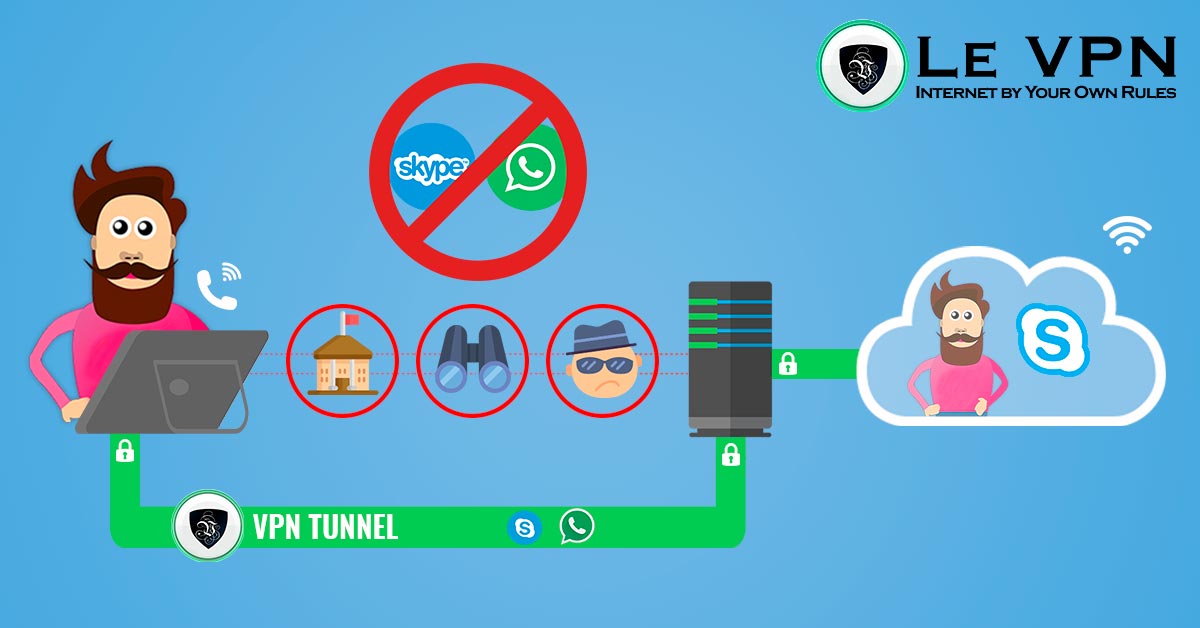
The benefits of using a VPN for VoIP calls
If you use VoIP (Voice over Internet Protocol) services to make online calls, you might be wondering whether you need a VPN (Virtual Private Network) to protect your communication. The short answer is yes - and the reasons go well beyond simple privacy. Here’s a full look at the benefits of using a VPN for VoIP calls, and how to set one up.
What is VoIP, and Why Does It Need Protecting?
VoIP is the technology that carries voice and video calls over the internet instead of traditional phone lines. It powers the apps you already use every day - WhatsApp, Zoom, Microsoft Teams, Google Meet, Viber, Signal, and dozens of others. VoIP calls are usually cheaper than regular phone calls (often free), more convenient, and packed with features like video, screen sharing, and group calls with people anywhere in the world.
But convenience comes with trade-offs. VoIP traffic travels across the open internet, which exposes it to problems a landline never had:
- Interception. On unsecured networks - hotel Wi-Fi, airport hotspots, café connections - call metadata and, with poorly secured apps, call content can be captured by anyone positioned between you and the internet.
- Surveillance and data collection. Your ISP can see which VoIP services you use, when, and for how long. In some countries, that information is logged and shared with authorities.
- Throttling. Some ISPs and mobile carriers deliberately slow down VoIP traffic, degrading call quality, because internet calls compete with their own paid voice services.
- Outright blocking. A number of countries and networks block VoIP apps entirely - either to protect telecom revenues or as part of broader censorship. Travelers in parts of the Middle East and Asia regularly discover their usual calling apps simply don't connect.
How a VPN Protects Your VoIP Calls
A VPN creates an encrypted tunnel between your device and a remote server. All your internet traffic - including your VoIP calls - passes through this tunnel, wrapped in strong encryption. To your ISP, the network operator, or anyone snooping on the connection, your call traffic becomes unreadable noise headed to a single VPN server.
Concretely, using a VPN for VoIP calls gets you:
- Cybersecurity. Eavesdroppers on public Wi-Fi can't intercept your calls or harvest the metadata around them - who you called, when, and from where.
- Strong encryption. Modern protocols like OpenVPN and WireGuard encrypt your traffic end-to-end between your device and the VPN server, adding a robust layer on top of whatever encryption your calling app provides.
- Online privacy. Your real IP address and location stay hidden from the services you call through and from anyone monitoring your connection. Because your ISP can no longer identify VoIP traffic patterns, service-specific throttling stops working too.
- Internet freedom. When a network or country blocks your calling app, connecting through a VPN server elsewhere restores access. And where networks use deep packet inspection to block VPNs themselves, Le VPN's Stealth WireGuard protocol disguises your VPN traffic so you can still get connected.
- Better call routing. Choosing a VPN server closer to the person you're calling - or simply on a less congested route - can noticeably improve call stability and quality.
Why Le VPN for VoIP
Not all VPNs are created equal. For internet calls specifically, you need fast, stable connections, strong security, and servers where you actually need them. Le VPN offers:
- Servers in 100+ locations across the Americas, Europe, the Middle East, Asia-Pacific and Africa - so there's always a well-placed server for your calls. Browse the full list on our servers page.
- Modern protocols: OpenVPN, WireGuard, Stealth WireGuard for restrictive networks, and IPSec/IKEv2 on iOS.
- Up to 10 simultaneous connections, covering your phone, laptop, and tablet on a single account - Windows, macOS, Android, and iOS apps included.
- A 30-day money-back guarantee on your first purchase, so you can test call quality on your own networks risk-free.
How to Set It Up
Getting protected takes minutes:
- Choose a plan on the Le VPN website and sign up.
- Download the Le VPN app for your device and log in with the VPN credentials from your activation email.
- Pick a server location - one near you for everyday privacy, or one in a specific country if you need to reach a blocked service - and hit Connect.
- Open your calling app and dial as usual. You can confirm your connection is protected at any time with our IP address test.
From that point on, every VoIP call you make travels through an encrypted tunnel - private, unthrottled, and available even on networks that would otherwise block it. Whether you’re a remote worker on back-to-back video meetings, an expat calling family, or a traveler whose hotel Wi-Fi can’t be trusted, a VPN turns internet calling into what it should have been all along: secure, reliable, and yours alone.
About the author

Le VPN Support Lead
Romain is a designer, analyst, and developer who has worked for several technology companies internationally in recent years. Founder of Magic Freelancer, he has collaborated with various blogs by writing articles on IT security news or producing popularization texts.
Articles by Romain Malburet →
