Hide Proxy Connections: What Is a Proxy and What Is an IP Address?
Proxy connections are at a strange point where they are both overvalued and undervalued, depending on who you ask. Some argue you should skip proxies entirely and either use a VPN or nothing; others believe a proxy can be just as good.
To settle this, we need to understand what a proxy connection actually is and how it’s used. Generally, a proxy connection does four things:
- Routes your traffic through a different device
- Masks your IP address with the proxy computer's address
- Receives all of your internet data on your behalf and forwards it to you
- Shares its bandwidth among all connected devices
The only thing separating a good proxy from a terrible one is trust. Technically speaking, a proxy server can be as secure and capable as any VPN server. But the price and maintenance involved, plus the shared bandwidth, usually mean it won’t stay good for long.
And if the proxy is bad, you’re literally handing all of your information to whoever runs it - potentially a hacker - with no control over what you’re sending or receiving.
Especially now, when premium VPN providers like Le VPN protect multiple devices for a modest subscription, it’s usually better to skip the proxy and use a dedicated, encrypted VPN server instead.
What is a Proxy?
Before we can weigh the benefits and risks of a proxy, we first need to understand what an IP address is and how it’s used on the internet.
Your IP address, similar to your home address, is the location you give to other computers so they know where to send the information you requested. You disclose it so that websites can send their pages, emails, and files to your PC, phone, or tablet. Your IP address is assigned by your Internet Service Provider (ISP), and while its primary use is essential, there are risks when too many parties you don’t trust know it - it reveals your approximate location and ties your browsing together. You can see exactly what your IP address currently reveals with Le VPN’s IP address test page.
Proxy means “substitute,” and a proxy server acts as a substitute IP address for your computer - used when you can’t reach a website directly, or when you want to keep your home IP out of the logs of sites you don’t trust.
Benefits of Not Being Around
The best comparison for a proxy server is a remote PO box: all the mail you don’t want arriving at your home goes there instead, and it’s used for much the same purposes.
Proxy connections are especially common in countries where legislation forbids access to specific websites - China being the most famous example, where a substantial share of internet users rely on proxies or a VPN to reach the open internet.
Proxies are cheap or free to use, but they come with a fundamental risk: whoever operates the proxy can see both your real IP address and everything you access through it.
Should You Use Proxy Connections?
Creating or joining a proxy connection is quite easy. Whether you’re setting up a proxy server or connecting to an existing one, there’s a wide range of tools for the job - many built directly into your operating system.
Most of this tooling is aimed at business users and larger companies that route their traffic through a secure company server with stronger protection than an individual workstation could provide.
Connecting to the internet through a proxy is similar to using your modem directly, except your traffic first passes through another computer, which then connects onward on your behalf.
On Windows, macOS, or Linux, it’s a straightforward matter of opening your network settings, enabling the proxy option, and entering the address of the proxy server. On phones and tablets, proxy settings are configured per Wi-Fi network, or through a third-party app.
Once connected, the proxy receives your requests and forwards them to websites and applications using its own IP address.
The obvious problem: every request you make is visible to - and can be recorded by - the proxy server. If you’re confident in the server’s privacy, or you don’t mind that party knowing your browsing history, it works. If not, you’ve just added a stranger to your connection.
Different Types of Proxies
There are four types of proxy servers, differing by level of anonymity and purpose: Anonymous Proxy Servers, High Anonymity Proxy Servers, Transparent Proxy Servers, and Reverse Proxy Servers.
Type 1: Anonymous Proxy
The most familiar type is the anonymous proxy, used to mask the IP address of the original computer. The endpoint receiving your requests has no way to see your home IP, and for extra protection, the connection between you and the proxy may be encrypted. This is how most individual users connect via proxy.
Type 2: High Anonymity Proxy
The high anonymity proxy goes further: it doesn’t announce itself as a proxy at all, presenting itself as a regular computer making ordinary requests. The endpoint website treats it as a normal client rather than a relay, which helps get past restrictions some sites place on known proxy servers.
Type 3: Transparent Proxy
A transparent proxy is a pass-through server that still presents your home IP as the source of the request. Since there’s no anonymity, it isn’t used for privacy but as a resource-sharing and caching layer - the basis for many corporate networks and cloud systems.
Type 4: Reverse Proxy
The reverse proxy works in the other direction: instead of shielding you as you access the web, it prevents others on the internet from directly reaching your machines. Businesses put reverse proxies in front of internal resources so that outside connections only ever touch a hardened server protected by encryption, firewalls, and monitoring.
Why Use a Proxy?
Depending on the type, a proxy serves individuals, small groups, or businesses. The two main personal reasons are to get around restrictions and to resist data collection.
Some countries - the People’s Republic of China being the most famous example - restrict access to a wide range of websites and applications, making them unreachable from a local IP address. Content is also restricted by publishers: streaming platforms, catch-up TV, and online video are routinely limited to specific regions while licensing is sorted out, so a service you use freely at home may be blocked the moment you travel.
Data Collection
Users also reach for proxies to keep ISPs, governments, and corporations from profiling their browsing habits. In the United States, for example, ISPs are permitted to sell browsing metadata, which then feeds targeted advertising built on your history.
Businesses, meanwhile, use proxies to share resources and protect information - a company server doing both jobs at once, guarding incoming requests while making shared data available across the internal network.
Anonymity
A proxy can provide a meaningful dose of anonymity, but you’re not anonymous from everyone. Your IP is masked from the website you visit, but it is fully known to the proxy server itself - even when your connection to that server is encrypted.
Proxy anonymity mainly defeats automated data collection, not a determined party who controls or compromises the server. Your information is only as secure as the proxy’s own protocols, and for popular public servers, the odds that someone unsavory is watching can be uncomfortably high.
In general, regard a proxy as a way to mask your IP - not as a security or anonymity measure. For real internet security and privacy, you need a VPN, an updated system, and good habits.
Why We Don't Recommend Free Proxy Lists
Search the web and you’ll find endless “free proxy lists” - hundreds of public servers with ratings, uptime figures, and speed scores. We used to track some of these ourselves, but we no longer publish such a list, and we’d encourage you to be wary of them, for three reasons:
- Churn: free proxies appear and vanish weekly. A server that was fine yesterday can be dead - or under new, hostile management - today, and the throwaway domains they use are recycled constantly.
- Unknown operators: running a server costs money. When access is free, the operator is earning somewhere - often by injecting ads, logging traffic, or harvesting credentials. Security researchers regularly find that a large share of public proxies tamper with traffic.
- No encryption: most free proxies don't encrypt your traffic, so your ISP, the proxy owner, and anyone in between can still read it.
If you only need to load one harmless geo-blocked page once, a free proxy might do. For anything involving logins, payments, personal data, or regular use, it’s the wrong tool.
Risks When Using a Proxy
With public proxies, two risks stand out - and both are outside your control, so you won’t always know you’ve been exposed.
The more common one is malware and spyware, pushed through the injected ads and modified pages that low-quality proxies serve. A trustworthy operator filters this; a bad one is the delivery mechanism.
Taking Over Your Server
The second risk is a hostile takeover: hackers compromising the proxy server itself and then monitoring, collecting, or altering everything that flows through it. On an untrusted proxy, anything you type may be captured - passwords, credit card numbers, personal identifiers.
A proxy should be used only for narrow, specific purposes, never as a substitute for regular security measures. If you need to mask your IP address and want encrypted protection against both automated collection and malicious individuals, a high-quality, professional VPN provider is far safer than any public proxy.
Difference Between a Proxy and a VPN
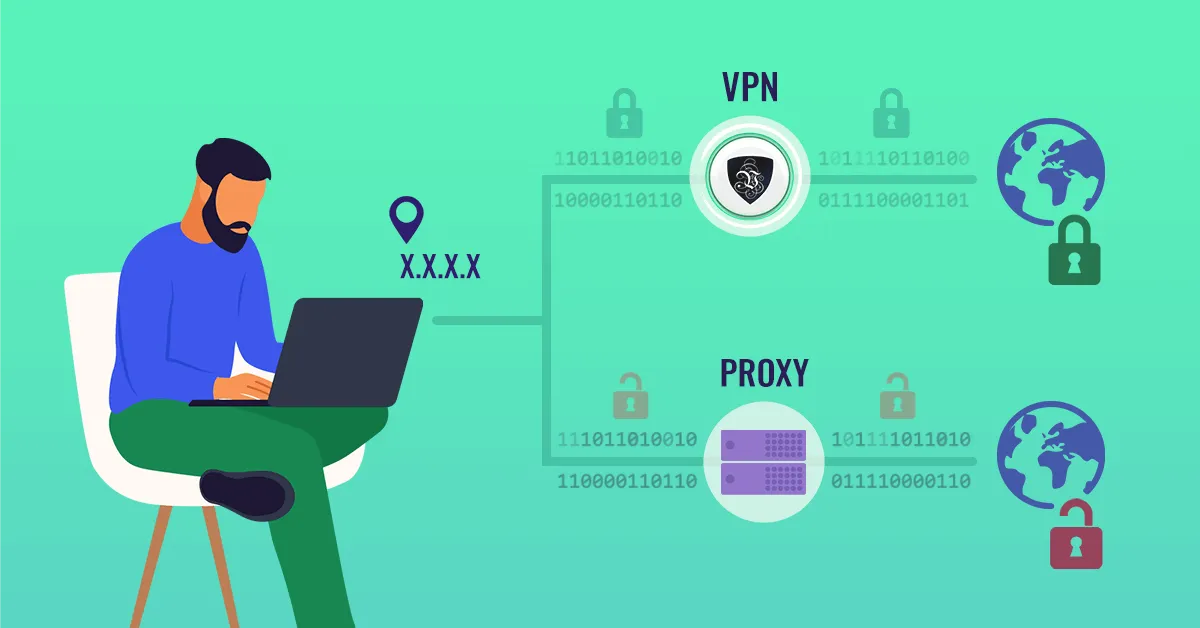
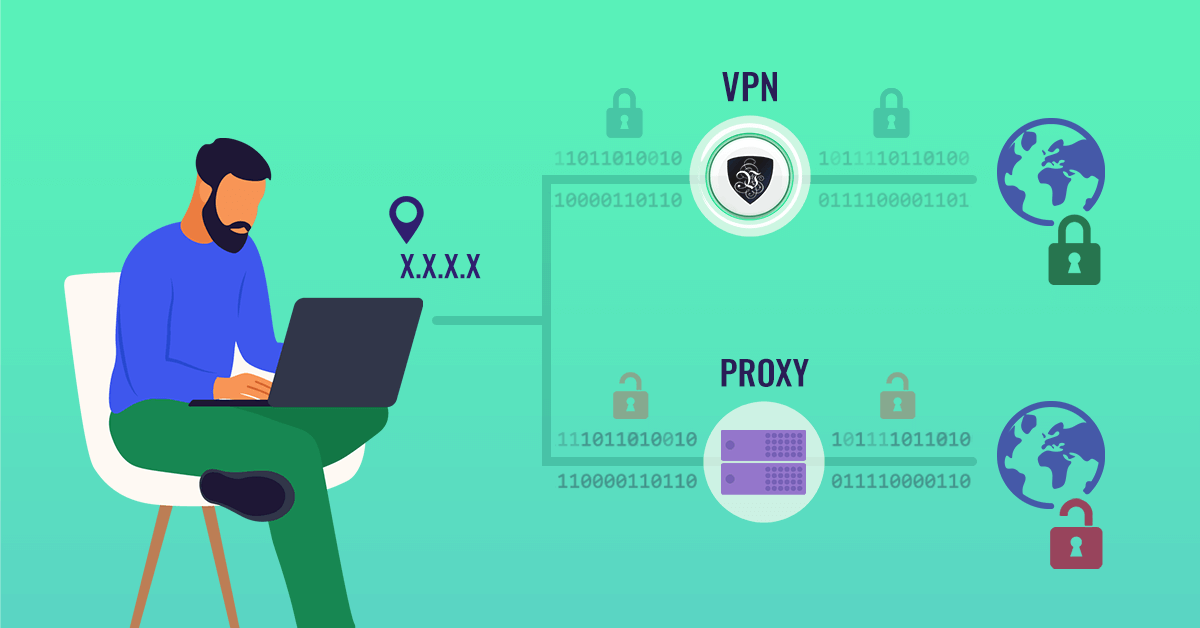
Think of a proxy as a forwarding address for your computer. It typically relays only SOCKS or HTTP/HTTPS traffic, and that relay can be intercepted by hackers or subverted by malware.
A VPN connection encrypts all traffic between you and your VPN provider, making it next to impossible for third parties to intercept or read what’s being transferred.
A proxy also only covers the applications configured to use it - anything else on your device (other apps, your printer, smart home gadgets) keeps connecting with your real IP. A VPN tunnel covers the whole device.
A good VPN gives you the best aspects of a high anonymity proxy plus strong encryption and safety protocols. As far as the internet is concerned, your location is wherever your VPN server is, and your security is as tough as your provider’s - with Le VPN, that means modern protocols like OpenVPN and WireGuard, plus Stealth WireGuard obfuscation for networks that try to detect and block VPN traffic. WireGuard connections even block traffic automatically if the tunnel drops, so nothing leaks in the clear.
Conclusion
Proxies still have their narrow uses, but today a VPN is the far superior option for everyday privacy. It’s safer, the connections are much faster, and every byte is encrypted rather than merely redirected.
Le VPN is one of the oldest VPN providers on the market, offering custom apps for Windows, macOS, Android, and iOS, multiple security protocols, high-speed VPN connections, up to 10 simultaneous connections per account, a selection of IP addresses in 100+ locations - and a 30-day money-back guarantee on your first purchase, so you can compare it against any proxy risk-free.
About the author

Guest Author
Vuk Mujović is the founder of MacTíre Consulting, an analyst, data management expert, and a long-term writer on all things business & tech. He authored blogs, articles, and opinion pieces aimed to help both companies and individuals achieve growth without compromising their security.
Articles by Vuk Mujović →
