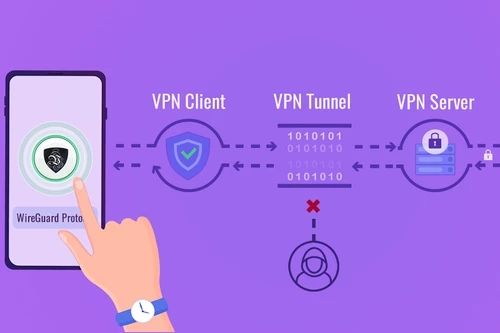
VPN for your router: protect every device at once
Set up Le VPN once on your router and every device on your network is protected automatically - laptops, phones, smart TVs, consoles, and gadgets that can't run a VPN app of their own. Le VPN works with any router that supports WireGuard, OpenVPN or L2TP/IPsec, including popular GL.iNet routers, the Freebox, and most home ISP boxes.
- One setup covers your entire home network
- Works with WireGuard, OpenVPN & L2TP/IPsec routers
- GL.iNet, Freebox, Asus, OpenWrt, DD-WRT, pfSense & more
- High-speed servers across 100+ locations worldwide
- 30-day money-back guarantee - try risk-free

Why put a VPN on your router?
A router-level VPN is the most complete way to protect your home. Instead of installing an app on every phone, laptop and tablet, you configure Le VPN once on the router itself - and every device that connects to your Wi-Fi is instantly protected. That includes smart TVs, streaming sticks, game consoles, and smart-home gadgets that have no VPN app of their own.
Because the router counts as a single connection, you protect an unlimited number of devices at home without using up your simultaneous connection slots. Guests, kids' tablets, and IoT devices all route through the same encrypted tunnel - no configuration, no reminders, no gaps.
One tunnel, your whole household covered
Once Le VPN is running on your router, your real IP address is hidden and all traffic leaving your home is encrypted with military-grade security under a strict no-logs policy. Your internet provider can no longer see which sites you visit or throttle your streaming and gaming. And with servers in 100+ locations, you can set your entire network's virtual location - handy for accessing services from home while you travel, or keeping the family's connection in one consistent region.
Prefer to protect devices individually when you're on the move? Your subscription also includes native Le VPN apps for Windows, macOS, Android and iOS - use the router at home and the app everywhere else.

Which routers work with Le VPN?
If your router has a built-in VPN client for WireGuard, OpenVPN or L2TP/IPsec, it works with Le VPN. That covers most modern routers, dedicated VPN routers, and many ISP-supplied boxes.
Not sure about your model? Check your router's admin panel for a VPN Client, OpenVPN Client or WireGuard section. If it's there, you can connect to Le VPN. Older or locked-down ISP boxes without a VPN client can still be paired with an inexpensive GL.iNet travel router running Le VPN.
GL.iNet routers: drag, drop, done
GL.iNet routers are a favourite for a reason - their admin panel has a built-in VPN Client that accepts custom WireGuard and OpenVPN profiles from any provider. Generate your Le VPN WireGuard config or download an OpenVPN .ovpn file, upload it on the VPN Client page, and toggle the connection on. Their compact travel routers are also perfect for turning any hotel or café Wi-Fi into your own private, Le VPN-protected network.

Freebox & home ISP boxes
Many ISP-supplied boxes now include a native VPN client. The Freebox Pop, Delta and Ultra, for example, ship with an integrated VPN client that supports WireGuard, OpenVPN and IPsec - just add your Le VPN server details and connect. Other ISP routers and stock firmwares (AsusWRT, OpenWrt, DD-WRT, FreshTomato, pfSense and OPNsense) expose the same OpenVPN and WireGuard client options. Wherever there's a VPN client field, Le VPN's server addresses, config files and credentials drop straight in.

Protocols you can use on your router
WireGuard
The modern choice for routers: lightweight, extremely fast, and supported by GL.iNet, Freebox, AsusWRT, OpenWrt, and pfSense. Generate a ready-made WireGuard config right from your Le VPN account, then import it into your router.
OpenVPN
The most widely compatible protocol. Le VPN provides ready-made .ovpn configuration files for every server, bundled by port (UDP 53, TCP 80, TCP 443) - works with virtually every router that has an OpenVPN client.
L2TP/IPsec
Built into many stock router firmwares and older ISP boxes. Enter your Le VPN server address, your VPN username and password, and the preshared key levpnsecret to connect.
How to set up Le VPN on your router
The exact menu names vary by router, but the steps are the same on every model.
1
Sign up & get your config
Choose a plan, then log in to your account. Generate a WireGuard config or download the OpenVPN files for your chosen server location.
2
Open your router's VPN client
In your router's admin panel, find the VPN Client, OpenVPN or WireGuard section. Upload your config file, or enter the server address, your VPN username and password by hand.
3
Connect & verify
Enable the connection and save. Then, from any device on your network, check your IP address - it should show the Le VPN server's location.
What you'll need
- Server address - e.g.
fr.zeropointer.netfor France, from your account's server list. - WireGuard config - generate it in your account (Manage Product > Information), where you can pick the country and scan a QR code or download the config file.
- OpenVPN config files - download the ZIP for the port you want: UDP 53, TCP 80, or TCP 443; each ZIP has one
.ovpnfile per server for that port. - L2TP/IPsec - use your VPN username and password with the preshared key
levpnsecret. - Your VPN credentials - the username and password from your activation email (these are separate from your website login - see below).
Looking for a click-by-click walkthrough for a specific firmware? See our step-by-step OpenVPN on DD-WRT guide, which mirrors the fields on most other routers.
Is a router VPN right for you?
A router setup is unbeatable for whole-home coverage, but it's not the only way to use Le VPN. Here's the honest trade-off.
Great for
- Protecting every device at home with one setup - including TVs, consoles and smart-home gadgets that have no VPN app.
- Covering an unlimited number of home devices under a single router connection.
- Guests and family who connect automatically, with no per-device configuration.
- Setting one consistent virtual location for your whole household.
Consider the app when
- You want to switch server locations quickly - the app changes locations in one tap, while a router usually needs reconfiguring.
- You need protection away from home - install the Le VPN app on your laptop or phone instead.
- Your ISP box has no VPN client - pair it with a GL.iNet router, or just use the apps.
- You want one-tap access to Threat Protection and Breach Detection, which live in the app.

Finding your VPN credentials
VPN connection credentials
Used to connect via WireGuard, OpenVPN or L2TP on your router. Sent to your email when you activated your account - not the same as your client area login. Forgot them? Log into the client area and use the menu to view or reset your VPN password.
Client area login
The email and password you use to sign into le-vpn.com/clients to manage your subscription, generate WireGuard configs, and download OpenVPN files. Forgot it? Reset your client area password here.
Trusted by 1,000,000+ users
Prefer a one-tap app instead?
Your subscription includes native Le VPN apps for every major platform. Use the router at home and the app when you're out - or skip the router entirely and just install the app.
Download the latest Le VPN app for all devices




Also available on


Try Le VPN risk-free for 30 days!
Don't like it within a month? Get your money back with no questions asked!

Quick recap
Installing Le VPN on your router protects every device on your home network with a single setup - laptops, phones, smart TVs, consoles and smart-home gadgets that can't run a VPN app of their own. Le VPN works with any router that supports WireGuard, OpenVPN or L2TP/IPsec, including GL.iNet routers, the Freebox, and most stock and ISP firmwares. Because the router counts as one connection, you can cover an unlimited number of home devices without using up your simultaneous connection slots.
- One router setup encrypts traffic and hides the real IP for your entire home network
- Compatible with GL.iNet, Freebox, Asus/AsusWRT, OpenWrt, DD-WRT, pfSense & OPNsense and more
- Three protocols supported: WireGuard (fastest), OpenVPN (most compatible) and L2TP/IPsec (preshared key
levpnsecret) - Set up in three steps: generate a config, load it into your router's VPN client, then connect and verify your IP
- The router counts as one connection, so an unlimited number of home devices are covered under it
- 100+ server locations, up to 10 devices on one account, 30-day money-back guarantee; native apps for Windows, macOS, Android and iOS are also included

