Why Is My IP Address Visible & how to Disable the IP Address Tracker?
Open any search engine and type “what is my IP” - your address appears instantly, in large numbers. That’s your first clue that an IP address tracker sits behind virtually every website, app, ad network, and analytics script on the internet. There’s nothing illegal about it: your IP is the public address of your connection, and the internet can’t deliver data without it. But “normal” doesn’t mean “harmless.” You wouldn’t publish your home address on every site you visit - and your IP deserves the same discretion.
What your IP address reveals
Your Internet Protocol address is the label your ISP assigns to your connection. Every website you visit sees it and, in most cases, logs it. From that single number, anyone can read:
- Your approximate location - usually your city or region.
- Your internet provider - which narrows down who you are and where you live.
- A thread to pull - combined with data from breaches, social media, or trackers, an IP helps link online activity to a real person.
You can see exactly what your connection currently broadcasts using Le VPN’s IP address test page. Free IP lookup tools like it exist all over the web - which means anyone who obtains your IP can run the same check on you.
Is every IP address tracker malicious?
No - most exist for mundane reasons. Websites use IP geolocation to serve the right language, show local content, and detect fraud. Video platforms use it to decide which country’s trending videos you see. Your ISP uses IP assignment simply to make your connection work - though depending on where you live, it may also be required to log your browsing history and share it with authorities.
The problem is what happens when that routinely collected data leaks or lands in the wrong hands. Website databases get breached constantly, and every breach that includes logged IPs hands attackers another piece of the puzzle.
The real risks of a visible IP
Targeted attacks and doxxing
If someone decides to target you - over a social media argument, a game, or a grudge - your IP is their starting point. A free lookup shows your city and ISP; social engineering does the rest. A caller pretending to be a customer confirming their address can trick a support line into completing the picture. Once your IP is tied to your name and address, harassment can move from your screen to your doorstep.
Profiling and phishing
Even without hacking anything, an unscrupulous company or attacker who watches your IP can learn your location, language, device, and browsing patterns - enough to craft convincing, targeted phishing messages that generic spam filters don’t resemble.
Denial-of-service and spam lists
A known IP can be flooded with junk traffic to knock you offline - a favorite tactic against gamers and streamers. Your address can also end up on spam lists, quietly degrading your access to services.
Home and property safety
The endgame of IP-based tracking is your physical address. Combine a located IP with social media posts announcing you’re on holiday, and you’ve handed burglars both the “where” and the “when.”
How to stop IP tracking
Not all solutions are equal, so let’s take them in ascending order of usefulness.
Blocking: doesn't work
You can’t simply “turn off” your IP. It’s the return address for everything you request online; remove it and the internet has nowhere to deliver your data. Router privacy options that hide your IP from other users on a network still leave it fully visible to every website you visit.
Proxies: partial cover
A proxy server relays traffic for a single app or browser, showing its address instead of yours. It works - if you trust the proxy’s operator and their security. A free proxy with no reputation is a gamble: you’re handing your entire browsing stream to a stranger, usually with no encryption.
Tor: anonymity with trade-offs
The Tor browser bounces your connection through volunteer relays, hiding your IP effectively. The costs are significant speed loss and coverage limited to the browser itself - the rest of your device’s traffic remains exposed.
A VPN: the complete answer
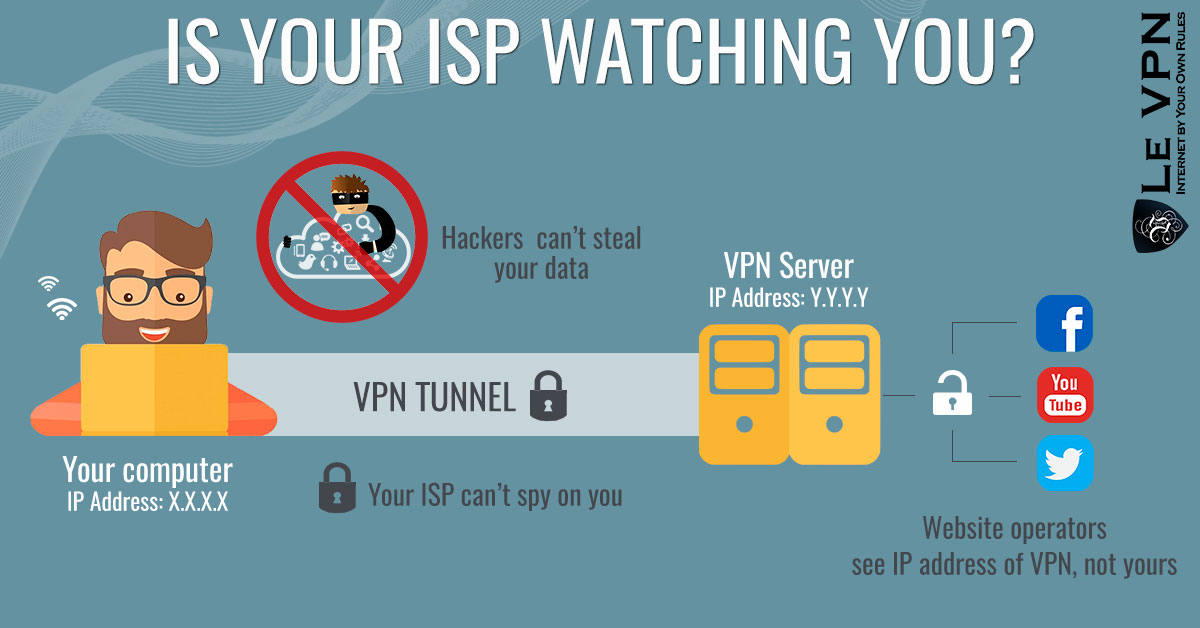
A VPN replaces your visible IP with the address of a server you choose and encrypts everything your device sends - every app, not just the browser. Websites, trackers, and attackers see only the VPN server, and anything aimed at “your” address hits hardened infrastructure halfway across the world instead of your home router. Your ISP, meanwhile, sees only an encrypted tunnel, not the sites you visit.
With Le VPN you can pick from servers in 100+ locations worldwide, protect up to 10 devices simultaneously, and choose modern protocols - OpenVPN, WireGuard, Stealth WireGuard, or IPSec/IKEv2. WireGuard’s design also blocks traffic automatically if the tunnel drops, so your real IP never leaks in a moment of disconnection. Geolocation even starts working for you: switch servers and you see the internet as France, Germany, or Japan sees it.
Conclusion
You can’t go online without an IP address - but you don’t have to tolerate an IP address tracker following it everywhere, feeding your location and habits to advertisers, data brokers, and worse. Blocking is impossible, proxies are partial, but a good VPN closes the question completely: your real address disappears behind an encrypted server, and the internet’s ever-present trackers log a dead end instead of you.
Le VPN comes with a 30-day money-back guarantee on your first purchase, so you can try it and browse without anyone looking over your shoulder.
About the author

Guest Author
Vuk Mujović is the founder of MacTíre Consulting, an analyst, data management expert, and a long-term writer on all things business & tech. He authored blogs, articles, and opinion pieces aimed to help both companies and individuals achieve growth without compromising their security.
Articles by Vuk Mujović →
