Where to find connections details & logs

If you’re having problems connecting to our VPN service, please follow steps below to send us the VPN connection logs.

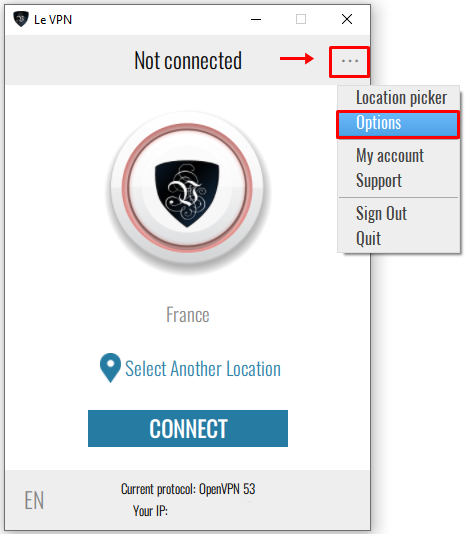
1) Launch Le VPN app,  and click on  "..." icon at the top-right followed by "Options".
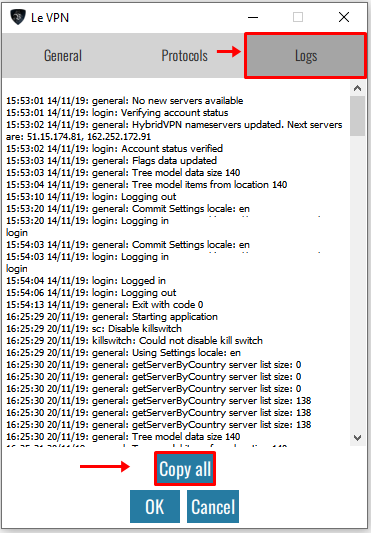
2) At the "Logs" tab, click on "Copy all" button which will copy the entire connection logs. Please paste it (CTRL+V or CMD+V) in your email and send it to our support team.
If you need any further assistance, please contact us via Live Chat or submit a ticket to our support team.

  • 107 Users Found This Useful
Was this answer helpful?

Related Articles

Can I use Le VPN on different computers?

Yes, you can install Le VPN on different computers. Moreover, five simultaneous connections with...

How to set up 2 factors authentication for your client area?

Two-factor authentication (2FA) is the second layer of security to protect your account. We...

Connection speed decreases while using Le VPN

Connection speed depends on your geographical location and internet provider. Please note that...

How to recover lost Le VPN credentials

Your credentials to access client area and the Le VPN app & connection are different.  To...

Le VPN servers list

Below is the list of Le VPN servers available to use with OpenVPN, PPTP and L2TP over IPSec....