Where to find connections details & logs

If you’re having problems connecting to our VPN service, please follow steps below to send us the VPN connection logs.

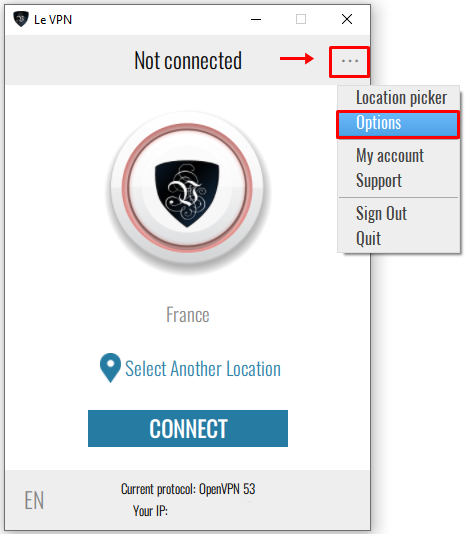
1) Launch Le VPN app,  and click on  "..." icon at the top-right followed by "Options".
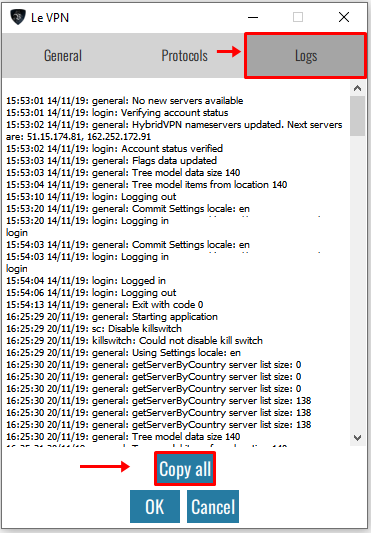
2) At the "Logs" tab, click on "Copy all" button which will copy the entire connection logs. Please paste it (CTRL+V or CMD+V) in your email and send it to our support team.
If you need any further assistance, please contact us via Live Chat or submit a ticket to our support team.

  • 107 Users Found This Useful
Was this answer helpful?

Related Articles

How to uninstall Le VPN

To uninstall Le VPN application on macOS go to your "Applications" folder, select "Le VPN.app"...

How to change the protocol?

Le VPN app automatically selects a protocol if one of the protocols is not reachable. However,...

What are “Recent” and “Favorite” connections?

When you click on "Select Another Location", countries are sorted in 4 different tabs. The 2...

How to recover lost Le VPN credentials

Your credentials to access client area and the Le VPN app & connection are different.  To...

Can I connect to a few Le VPN servers from the same device at the same time?

No, you can connect to only one VPN server from one device.You can, however, connect up to five...